Default privacy settings on your Wi-Fi baby monitor are vulnerable and leave your family’s privacy at risk. Make sure to change the default password to a strong, unique one and update the firmware regularly to fix security flaws. Disable remote access features and unnecessary cloud options, and use encryption and network segmentation to protect your device. Keep security in mind and explore more tips to stay safe and private.
Key Takeaways
- Change default passwords and disable remote access to prevent unauthorized device control.
- Enable WPA3 or WPA2 encryption on your Wi-Fi network to secure video and audio streams.
- Turn off unnecessary features like cloud backups and notifications to reduce security vulnerabilities.
- Regularly update firmware and activate auto-updates to fix security flaws promptly.
- Set up a separate guest network and disable remote viewing to isolate the baby monitor from main devices.

Tripod Baby Monitor Mount for HelloBaby HB65/HB40/HB6550/HB6560/HB6148/HB66/HB6339/HB6550 Pro, ANMEATE SM935E, Flexible Baby Camera Mount Attach Your Camera Wherever You Want
Compatible with hello baby monitor HB65/HB40/HB6550/HB6560/HB6148/ HB66/HB6339/HB6550 Pro, ANMEATE SM935E, and also fit other baby cameras with standard…
As an affiliate, we earn on qualifying purchases.
As an affiliate, we earn on qualifying purchases.
Why Default Settings Make Your Wi-Fi Baby Monitor a Privacy Risk

Many Wi-Fi baby monitors come with default settings that can leave your device vulnerable. These default configurations often lack proper security measures, creating potential device vulnerabilities that hackers can exploit. If you’re unaware of these risks, you might unknowingly expose sensitive footage of your baby’s space. User awareness is vital here—many parents don’t realize that leaving settings unchanged can give intruders easy access. Without changing default passwords or enabling encryption, your monitor becomes an open door for unauthorized viewers. Hackers can intercept video feeds or even take control of the device, compromising your family’s privacy. Being proactive by understanding the risks associated with default settings is the first step toward protecting your home and your little one. Additionally, ensuring your device’s contrast ratio is properly configured can help improve image clarity and make it easier to monitor your baby effectively. Recognizing that default security settings are often inadequate emphasizes the importance of customizing your device’s protections immediately.

HelloBaby No WiFi Baby Monitor 5" Screen 30-Hour Battery Pan-Tilt-Zoom Video Upgrade with Camera and Audio, Night Vision, VOX, 2-Way Talk, 8 Lullabies and 1000ft Range, HB6550
Remote 355° Pan and Tilt Baby Monitor & 5" Color Display: Enjoy a 5" Big Screen on this…
As an affiliate, we earn on qualifying purchases.
As an affiliate, we earn on qualifying purchases.
How to Change Your Baby Monitor’s Default Password and Create a Strong One

Start by locating your baby monitor’s default password, which is often printed on the device or in the user manual. Then, create a strong, unique password that’s difficult for others to guess, combining letters, numbers, and symbols. Updating these credentials helps protect your privacy and keeps your baby safe. Additionally, review and adjust your device’s privacy settings to limit access and prevent unauthorized monitoring. Ensuring your device adheres to security best practices can also add an extra layer of protection against potential threats. Understanding nail biology can also serve as a reminder of the importance of maintaining overall health and hygiene, which indirectly supports your well-being while caring for your baby. Being aware of privacy concerns related to connected devices emphasizes the need to stay vigilant about safeguarding your personal information.
Find Default Passwords
To change your baby monitor’s default password, you first need to find where it’s listed, which is usually in the device’s manual or on the manufacturer’s website. Many devices come with factory-set passwords that are easy for cybercriminals to discover, exposing you to digital vulnerabilities. By locating the default password, you can update it to improve your password management and protect your privacy. It’s essential to review your device’s settings or documentation to identify the default credentials. Once found, change the password immediately to prevent unauthorized access. Remember, using default passwords leaves your monitor open to hacking, so always update them to strengthen your security and safeguard your family’s privacy. Additionally, being aware of common default passwords can help you better understand the risks and take appropriate action. Knowing how to secure your devices is a crucial step in protecting your home’s digital environment. Regularly updating your passwords and staying informed about cybersecurity best practices can further enhance your privacy protections.
Create Strong Passwords
Wondering how to create a strong password for your baby monitor? Start by focusing on password complexity. Use a mix of uppercase and lowercase letters, numbers, and special characters to make it harder for hackers to guess. Avoid common words or easily accessible personal info like birthdays. Changing the default password is vital for effective user authentication, which verifies your identity and keeps unauthorized users out. Create a password that’s at least 12 characters long to increase security. Don’t reuse passwords from other accounts. Regularly update your password to maintain protection. Additionally, enabling security features provided by the manufacturer can further enhance your monitor’s defenses against breaches. Implementing best practices in cybersecurity can help protect your devices from emerging threats. Being aware of device limitations and potential vulnerabilities can help you stay proactive in safeguarding your privacy. Regularly reviewing your privacy settings ensures you maintain control over who has access to your baby monitor. According to best practices, detecting passive voice can help improve clarity and engagement in your writing. By choosing a complex, unique password, you strengthen your monitor’s defenses against potential breaches and ensure your baby’s privacy remains secure.

ARENTI WiFi Baby Camera Monitor B2 Kit 2025 Upgraded, 5-inch Wireless Display, Smartphone App, Encrypted Connection, Lullaby, Super Night Vision, Auto Tracking, Temp Sensor, Support Local Storage
Easy Installation & Dual Usage – Enjoy plug-and-play convenience with two options to use. Use the LCD screen…
As an affiliate, we earn on qualifying purchases.
As an affiliate, we earn on qualifying purchases.
How to Secure Your Wi-Fi Network to Keep Your Baby Monitor Safe

To protect your baby monitor, start by changing your Wi-Fi network’s default passwords and creating strong, unique ones. Next, enable network encryption to prevent unauthorized access. You should also set up a guest network to keep your main devices separate and secure. Additionally, consider monitoring your network activity regularly to detect any unusual or unauthorized access attempts. Incorporating network security best practices can further enhance your Wi-Fi safety and safeguard your smart home devices. Applying encryption protocols ensures your data remains protected during transmission, adding an extra layer of security.
Change Default Passwords
Have you changed the default password on your Wi-Fi baby monitor? Default credentials are easy for hackers to guess, so it’s vital to set a strong, unique password. Focus on password complexity by including a mix of uppercase and lowercase letters, numbers, and symbols. Avoid common words or predictable patterns. Many devices come with default credentials like “admin” or “password,” which are the first targets for cyber intruders. Changing these immediately considerably improves your security. Take a moment to update your password through the device’s settings, ensuring it’s not easily guessable. Regularly changing passwords and avoiding reuse across devices adds extra layers of protection. Remember, a strong, unique password is your first line of defense against unauthorized access.
Enable Network Encryption
Securing your Wi-Fi network with encryption is essential to protect your baby monitor from unauthorized access. Encryption enhances your network security by scrambling data transmitted between devices, making it difficult for outsiders to intercept or understand. To enable this, access your router’s settings and select the strongest encryption protocol available, usually WPA3 or WPA2. Avoid outdated options like WEP, which are vulnerable to attacks. By enabling network encryption, you greatly improve data protection for your entire network, including your baby monitor. Implementing artificial intelligence in security protocols can further detect and prevent unauthorized access attempts. Additionally, using a strong, unique password for your Wi-Fi network adds an extra layer of security that helps prevent hackers from gaining control or viewing sensitive footage. Regularly check your router’s security settings to ensure encryption remains active and up to date, maintaining a safer environment for your family’s privacy. Incorporating security zone info into your home network management can also help you identify and isolate potential vulnerabilities. For optimal protection, consider enabling network monitoring tools that alert you to suspicious activity on your network.
Create Guest Networks
Creating a guest network is an effective way to keep your baby monitor safe from unauthorized access. By setting up a separate guest network, you isolate your main devices from potential threats, reducing the risk of hacking. This guest network acts as a barrier, allowing your visitors to use the internet without gaining access to your primary devices. Enable device isolation on the guest network, so devices connected there can’t communicate with each other or access your main network. This added layer of security guarantees that even if a guest device is compromised, your baby monitor remains protected. Regularly update your router’s firmware and change passwords to strengthen security further. Creating a dedicated guest network is a simple but powerful step to safeguard your baby’s privacy.
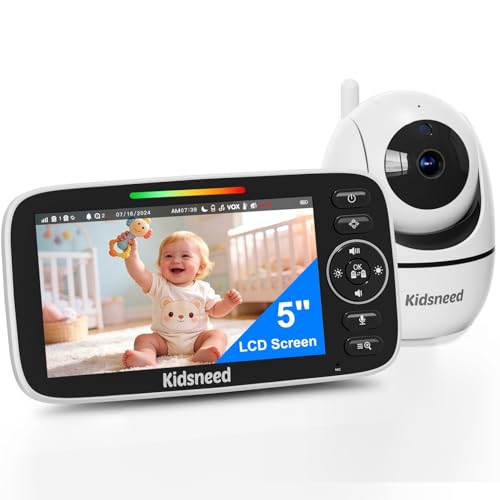
Kidsneed Baby Monitor with Camera and Audio – 5 inch 720P Video Baby Monitor, No WiFi, 48H Battery Life, Night Vision, Two Way Talk, Remote Pan Tilt Zoom, Thermal Monitor,1000 ft Range (530)
CALM AND CONNECT WITH YOUR LITTLE ONE – Discover a simple, hassle-free way to keep an eye on…
As an affiliate, we earn on qualifying purchases.
As an affiliate, we earn on qualifying purchases.
Why Updating Firmware and Enabling Auto-Updates Matters for Privacy

Keeping your Wi-Fi baby monitor’s firmware up to date is essential because manufacturers regularly release updates that fix security vulnerabilities. Firmware updates patch known weaknesses, preventing hackers from exploiting them to gain unauthorized access. Enabling auto updates makes this process effortless, ensuring your device stays protected without you having to manually check for new versions. When auto updates are active, security flaws are addressed promptly, reducing the window of opportunity for cyber threats. Ignoring firmware updates leaves your monitor exposed to potential breaches, risking your privacy and your child’s safety. By keeping your firmware current and enabling auto updates, you’re proactively safeguarding your device against emerging security risks and ensuring your monitor operates securely and efficiently.
How to Disable Remote Access and Unnecessary Features on Your Baby Monitor

Even with firmware updates reducing security risks, disabling remote access and unnecessary features on your baby monitor adds an extra layer of protection. First, review your device’s settings to turn off remote viewing options, preventing outside connections. Check the parental controls to limit who can access the monitor and avoid granting unnecessary app permissions that could expose your device to vulnerabilities. Disable features like cloud backups, notifications, or remote streaming if you don’t need them. This minimizes potential entry points for hackers. Regularly revisit your settings to ensure remote access remains disabled. By tightening these controls, you reduce the chances of unauthorized access, keeping your baby’s privacy safe and your peace of mind intact.
Using Encryption and Network Segmentation to Protect Your Baby Monitor

To better protect your baby monitor from unauthorized access, using encryption and network segmentation is essential. Start by enabling Wi-Fi encryption, such as WPA3 or WPA2, to secure your wireless communication. This prevents hackers from intercepting your video and audio streams. Additionally, implement network segmentation by creating a separate Wi-Fi network for your baby monitor, isolating it from your main devices. This limits potential vulnerabilities if other devices are compromised. Using strong, unique passwords for your network also enhances security. Regularly update your monitor’s firmware to patch security flaws. Combining Wi-Fi encryption with network segmentation creates multiple layers of protection, making it markedly more difficult for intruders to access your baby monitor and ensuring your family’s privacy remains intact.
How to Maintain Your Privacy: Ongoing Tips and Monitoring

Maintaining your privacy with a baby monitor requires ongoing vigilance and regular monitoring. You should perform routine privacy audits to spot vulnerabilities and ensure your settings stay secure. Consistently review and update parental controls to limit access and prevent unauthorized viewers. Keep your firmware current and change passwords periodically to reduce risks. Use the table below to guide your ongoing privacy efforts:
| Action | Purpose |
|---|---|
| Privacy audits | Detect and fix potential security issues |
| Update firmware | Patch vulnerabilities and improve security |
| Change passwords regularly | Prevent unauthorized access |
| Review parental controls | Ensure only trusted users can view |
| Monitor device activity | Detect suspicious activity early |
Frequently Asked Questions
Can I Use My Baby Monitor Without Internet Access Securely?
Yes, you can use your baby monitor securely without internet access by connecting it solely to your local network. This setup keeps your data within your home, reducing external risks. Make sure your monitor supports encrypted communication and enable data encryption settings. Avoid using default passwords, and regularly update your device’s firmware. By doing so, you protect your privacy and keep your baby’s space secure from potential intrusions.
Are Third-Party Apps Safe for Viewing My Baby Monitor Feeds?
Third-party apps can be risky for viewing your baby monitor feeds because of potential third-party app risks. They may not have strict security measures, making your video streams vulnerable. Always check and adjust app permission settings to limit access to your camera and microphone. If you’re unsure about an app’s safety, it’s better to use the monitor’s official app or secure, local viewing methods to protect your privacy.
How Often Should I Change My Baby Monitor’s Password?
You should change your baby monitor’s password regularly, ideally every three months, to stay ahead of potential threats. Consistent password updates help reinforce your security policies and protect your privacy. Avoid using the same password for long periods, and choose strong, unique combinations. By staying proactive with password updates, you make it harder for unauthorized users to access your feed and ensure your baby’s safety remains a top priority.
What Signs Indicate My Baby Monitor Has Been Hacked?
If your baby monitor has been hacked, you’ll notice signs like unauthorized access or suspicious activity on your device. You might see strange camera movements, unexpected audio, or unfamiliar users connected to your monitor. Alerts or notifications about changes in settings could also appear. Trust your instincts—if anything seems off, change your password immediately, review your privacy settings, and disconnect the device from the internet until you’re sure it’s secure.
Is It Necessary to Disable Bluetooth on My Baby Monitor?
Did you know that over 60% of wireless devices face security risks? You should disable Bluetooth on your baby monitor if you’re concerned about Bluetooth security and potential wireless interference. Keeping Bluetooth turned off reduces the chance of hackers intercepting signals and minimizes interference that could disrupt the monitor’s performance. It’s a simple step to safeguard your privacy and ensure your baby’s safety.
Conclusion
By taking these simple steps, you’re gently tightening the invisible threads that keep your little one’s world secure. Think of it as tuning a delicate instrument—small adjustments can make a big difference. Stay vigilant, keep your settings fresh, and your baby monitor will remain a quiet guardian. After all, a little attention now helps guarantee peaceful nights and happy days, letting you focus on the moments that truly matter.