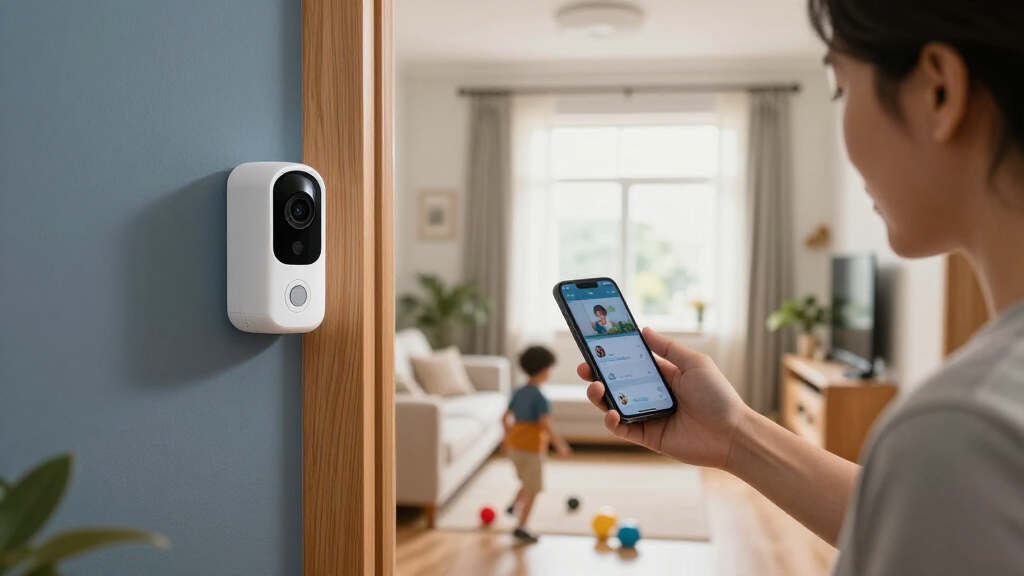

The best smart home security devices match the way you live, whether you need a coordinated alarm system or one camera for a key room. My best overall pick is the Ring Alarm 14-Piece Wireless Security System for buyers who want a broader set of entry points covered in one kit. The eufy Security 5-Piece Home Alarm Kit is a simpler alternative, while the Wyze Bulb Cam stands out for adding a camera in a light socket. The main tradeoffs are coverage versus setup effort, a full alarm system versus individual devices, and how much you rely on Wi-Fi or a hub. Read on for the full breakdown and help matching a system to your home.

Turn the school run and nap time into listening time
- Thousands of audiobooks, podcasts and originals
- Listen on your phone, tablet or Echo — also offline
- Cancel anytime
Complete the kit


Key Takeaways
- Ring Alarm 14-Piece leads for buyers who want a more complete starting set; the smaller Ring kits make more sense when you need fewer entry points covered.
- eufy’s 5-piece kit is a more approachable alarm-focused option, while the Ring kits offer several ways to scale coverage across a home.
- Wyze Bulb Cam and Kasa EC71 solve camera needs, not whole-home alarm needs; choose them to monitor a room or specific area.
- Tapo’s sensor kit focuses on doors and windows, so it suits buyers who want alerts at entry points without starting with a large alarm package.
- Large bundles such as the 21- and 22-piece systems promise broad coverage, but buyers should check what each component does and how the system connects before choosing kit size.
| eufy Security 5-Piece Home Alarm Kit |  | Best No-Monthly-Fee Alarm Starter Kit | Included components: HomeBase, keypad, motion sensor, 2 entry sensors | Installation: Self-installation with included mounts | Notifications: Alerts through the eufy Security app | VIEW LATEST PRICE | See Our Full Breakdown |
| Ring Alarm 14-Piece Wireless Security System |  | Best for Larger Homes | Kit size: 14 pieces | Included components: 1 base station, 2 keypads, 8 contact sensors, 2 motion detectors, 1 range extender | Recommended home size: 2–4 bedrooms | VIEW LATEST PRICE | See Our Full Breakdown |
| Ring Alarm 8-Piece Home and Business Security System |  | Best Ring Starter Kit for Smaller Homes | Kit size: 8 pieces | Included components: Base station, keypad, 4 contact sensors, motion detector, range extender | Recommended home size: 1–2 bedrooms | VIEW LATEST PRICE | See Our Full Breakdown |
| Wyze Bulb Cam 2K HD Smart Light Bulb Security Camera |  | Best Discreet Camera-and-Light Combo | Socket: E26 | Power: 120V, 60Hz | Camera resolution: 2K HD | VIEW LATEST PRICE | See Our Full Breakdown |
| Tapo Tapo T31 Smart Door and Window Sensor Starter Kit with Hub, 3 Sensors |  | Best for Smart-Home Door and Window Automations | Included: 3 Tapo T110 contact sensors and 1 Tapo H100 smart hub | Wireless protocol: Sub-G | Wi-Fi requirement: 2.4 GHz | VIEW LATEST PRICE | See Our Full Breakdown |
| 22-Piece Wireless Home Security System with 2K Camera, Wi-Fi and 4G |  | Best for Broad Sensor Coverage | Included components: 22-piece system | Camera resolution: 2K | Connectivity: 2.4 GHz Wi-Fi and 4G SIM | VIEW LATEST PRICE | See Our Full Breakdown |
| Ring Alarm 5-Piece Wireless Security System |  | Best for Ring Ecosystem Users | Included components: Base station, keypad, contact sensor, motion detector, and range extender | Connectivity: Wireless | App control: Ring app | VIEW LATEST PRICE | See Our Full Breakdown |
| X-Sense AS05 Wireless Home Security System, 5-Piece Set |  | Best for Easy DIY Setup | Model: AS05 | Components: Base station, two door sensors, motion sensor, and keypad | Connectivity: Wireless; 2.4 GHz Wi-Fi only | VIEW LATEST PRICE | See Our Full Breakdown |
| Kasa EC71 1080p Indoor Pan/Tilt Security Camera | 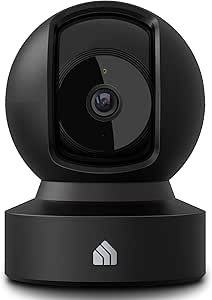 | Best Compact Indoor Camera | Model: EC71 | Video resolution: 1080p Full HD | Pan and tilt: 360° horizontal and 113° vertical | VIEW LATEST PRICE | See Our Full Breakdown |
| XUK Wireless Home Alarm System with 4.3-Inch Touchscreen |  | Best for Multiple Ways to Disarm | Model: XK-A107F | Screen size: 4.3 inches | Connectivity: 2.4 GHz Wi-Fi | VIEW LATEST PRICE | See Our Full Breakdown |
| 21-Piece Wi-Fi Home Alarm System with Alexa Compatibility |  | Best for Broad DIY Coverage | System size: 21 pieces | Connectivity: 2.4 GHz Wi-Fi | Sensor technology: Magnetic contact, PIR, RFID | VIEW LATEST PRICE | See Our Full Breakdown |
| Tolviviov 8-Piece WiFi Wireless Home Alarm System |  | Best for Simple, Expandable Entry Protection | Included components: Alarm siren station, five door and window sensors, two remote controls | Connectivity: Wireless 2.4 GHz Wi-Fi; no 5 GHz support | Maximum expandability: 20 sensors and five remotes or keypads | VIEW LATEST PRICE | See Our Full Breakdown |
| smart home security device | Connectivity | Included components |
|---|---|---|
| eufy Security 5-Piece Home Ala | — | HomeBase, keypad, motion sensor, 2 entry sensors |
| Ring Alarm 14-Piece Wireless S | Wireless | 1 base station, 2 keypads, 8 contact sensors, 2 motion detectors, 1 range extender |
| Ring Alarm 8-Piece Home and Bu | Wi-Fi | Base station, keypad, 4 contact sensors, motion detector, range extender |
| Wyze Bulb Cam 2K HD Smart Ligh | — | — |
| Tapo Tapo T31 Smart Door and W | — | — |
| 22-Piece Wireless Home Securit | 2.4 GHz Wi-Fi and 4G SIM | 22-piece system |
| Ring Alarm 5-Piece Wireless Se | Wireless | Base station, keypad, contact sensor, motion detector, and range extender |
| X-Sense AS05 Wireless Home Sec | Wireless; 2.4 GHz Wi-Fi only | — |
| Kasa EC71 1080p Indoor Pan/Til | 2.4 GHz Wi-Fi | — |
| XUK Wireless Home Alarm System | 2.4 GHz Wi-Fi | — |
| 21-Piece Wi-Fi Home Alarm Syst | 2.4 GHz Wi-Fi | — |
| Tolviviov 8-Piece WiFi Wireles | Wireless 2.4 GHz Wi-Fi; no 5 GHz support | Alarm siren station, five door and window sensors, two remote controls |
More Details on Our Top Picks
eufy Security 5-Piece Home Alarm Kit
The eufy Security 5-Piece Home Alarm Kit makes the most sense for buyers who want a coordinated alarm setup without adding a monthly service fee. Its HomeBase, keypad, motion sensor, and two entry sensors cover both movement inside and breaches at selected doors or windows, while app alerts keep you informed when you are away. Compared with the Ring Alarm 8-Piece Home and Business Security System, this kit keeps the setup simple and avoids a subscription requirement for the listed alerts, but it includes fewer sensors and less room coverage. The included mounts and self-install design suit a straightforward home setup. The tradeoff is limited coverage out of the box: larger homes or households with many entry points may need a more extensive kit, and the supplied details do not list professional monitoring.
Pros:- No monthly fees are listed for the kit’s app alerts
- Combines entry sensors with an indoor motion sensor
- Includes a HomeBase and keypad in the starter set
- Designed for self-installation with included mounts
Cons:- Only two entry sensors are included, limiting initial coverage
- The supplied product details do not specify professional monitoring
- Fewer sensors come in the box than in the larger Ring Alarm 14-Piece kit
Best for: Homeowners or renters who want basic door, window, and motion alerts without recurring service fees.
Not ideal for: Households with many entry points or buyers seeking a large sensor bundle or stated professional monitoring options.
- Included components:HomeBase, keypad, motion sensor, 2 entry sensors
- Installation:Self-installation with included mounts
- Notifications:Alerts through the eufy Security app
- Monthly fees:None
- Detection types:Motion and entry-point detection
- Entry sensor count:2
Our verdict“Choose this kit for fee-free app alerts and a simple starter setup, but look to a larger bundle if you need to cover many doors and windows.”
Ring Alarm 14-Piece Wireless Security System
For a home with several doors, windows, and rooms to cover, the Ring Alarm 14-Piece Wireless Security System is the most extensive alarm bundle in this group. Eight contact sensors and two motion detectors give it a broader starting footprint than the Ring Alarm 8-Piece Home and Business Security System, while two keypads can make everyday arming more convenient at separate entrances. A range extender is also included, and the Ring app handles notifications and device monitoring. The compromises are subscription dependence and ongoing add-on costs: remote arming, backup connectivity, professional monitoring, and Alexa voice control require a compatible Ring Protect Plan, while extra sensors are sold separately. Its two-to-four-bedroom recommendation makes it a better fit for larger layouts than compact starter kits, but buyers should check which app and monitoring features need a plan.
Pros:- Includes eight contact sensors and two motion detectors
- Two keypads suit homes with multiple entry points
- Range extender comes in the kit
- Expandable with separately sold compatible sensors and accessories
Cons:- Remote arming, backup connectivity, professional monitoring, and Alexa voice control require a compatible plan
- Additional sensors and accessories are sold separately
- The large sensor bundle may be more than a small home needs
Best for: Owners of two-to-four-bedroom homes who want multiple keypads and broad door, window, and motion coverage from one kit.
Not ideal for: Small households seeking a minimal setup or buyers who want remote arming, backup connectivity, or professional monitoring without a subscription.
- Kit size:14 pieces
- Included components:1 base station, 2 keypads, 8 contact sensors, 2 motion detectors, 1 range extender
- Recommended home size:2–4 bedrooms
- Connectivity:Wireless
- App control:Ring app
- Alexa compatibility:Voice arming and disarming require a compatible Ring Protect subscription
- Professional monitoring:Available with a compatible Ring Protect Plan
Our verdict“Pick this bundle for broad coverage across a larger home, provided the plan requirements for the features you want fit your needs.”
Ring Alarm 8-Piece Home and Business Security System
The Ring Alarm 8-Piece Home and Business Security System is a more contained entry into Ring’s alarm ecosystem than the 14-piece bundle. Four contact sensors and one motion detector are suited to covering a handful of doors or windows and a main room in a one-to-two-bedroom home; the keypad and range extender round out the core kit. Like its larger Ring counterpart, it sends mobile alerts and supports device monitoring through the Ring app, with optional features such as professional monitoring and Alexa voice control tied to a compatible Ring Protect Plan. That makes it less appealing for buyers who want all listed capabilities without a subscription. Compared with the eufy Security 5-Piece Home Alarm Kit, it includes more entry sensors and a range extender, but its plan-dependent features create a different ongoing commitment.
Pros:- Four contact sensors and a motion detector cover several common detection points
- Range extender is included
- Ring app provides mobile notifications and device monitoring
- Can be expanded with separately sold compatible accessories
Cons:- A compatible Ring Protect Plan is required for several optional features
- Additional sensors and accessories are sold separately
- The included sensor count is limited for homes with many doors and windows
Best for: Residents of one-to-two-bedroom homes who want a modest Ring setup with contact sensors, motion detection, and room to expand.
Not ideal for: Buyers who need coverage for a larger home or want remote arming and professional monitoring without a compatible Ring plan.
- Kit size:8 pieces
- Included components:Base station, keypad, 4 contact sensors, motion detector, range extender
- Recommended home size:1–2 bedrooms
- Connectivity:Wi-Fi
- Mobile app:Ring app
- Optional monitoring:24/7 professional monitoring with a compatible Ring Protect Plan
Our verdict“Choose this smaller Ring kit for a one-to-two-bedroom home, and step up to the 14-piece system if you need more sensors from the start.”
Wyze Bulb Cam 2K HD Smart Light Bulb Security Camera
The Wyze Bulb Cam 2K HD combines an outdoor camera and a dimmable 800-lumen bulb in a standard E26 socket, making it a distinctive pick for monitoring a spot that already has a suitable light fitting. Its 2K video, 160° field of view, color night vision, motion and sound alerts, two-way audio, and built-in siren add security functions beyond a basic smart bulb. Continuous local recording is available with a separately purchased microSD card, unlike alarm kits such as the eufy Security 5-Piece Home Alarm Kit, which focus on entry and motion sensors rather than video. The main limitation is positioning: pan and tilt must be adjusted by hand, so the camera cannot remotely follow activity. It also needs 2.4 GHz Wi-Fi and must not be used with a dimmer switch.
Pros:- Combines an outdoor camera with a dimmable 800-lumen bulb
- 2K video, color night vision, and a 160° field of view support broad visual coverage
- Supports continuous local recording to a separately purchased microSD card
- Includes two-way audio, motion and sound alerts, and a built-in siren
Cons:- Pan and tilt adjustments are manual rather than remotely controlled
- Requires 2.4 GHz Wi-Fi and is incompatible with 5 GHz networks
- MicroSD card is sold separately, and the bulb must not be used with a dimmer switch
Best for: Homeowners with an outdoor E26 socket who want a camera, light, and local recording in one fitting.
Not ideal for: Buyers who need remote pan-and-tilt control, have only 5 GHz Wi-Fi, or need a camera placement independent of a light socket.
- Socket:E26
- Power:120V, 60Hz
- Camera resolution:2K HD
- Field of view:160°
- Manual adjustment:360° pan, 90° tilt
- Wi-Fi:2.4 GHz; not compatible with 5 GHz
- Local recording:Continuous recording to microSD card up to 256GB; card sold separately
- Bulb:800 lumens, 3000K warm light, dimmable
- Compatibility:Alexa, Google Assistant, IFTTT, and Wyze Rules
Our verdict“Choose the Wyze Bulb Cam if a suitable E26 socket can cover your target area and you want video security integrated with outdoor lighting.”
Tapo Tapo T31 Smart Door and Window Sensor Starter Kit with Hub, 3 Sensors
The Tapo T31 Starter Kit is a focused choice for monitoring doors and windows rather than building a full alarm system. Three Tapo T110 contact sensors connect through the included H100 hub, which adds a built-in chime and a customizable 90 dB alarm. The sensors can also trigger app alerts and smart-home automations, with Matter support and compatibility listed for Alexa, Google Home, Apple HomeKit, and Samsung SmartThings. That makes this kit more flexible for connected routines than the Ring Alarm 8-Piece Home and Business Security System, but it does not include a motion detector or keypad. Magnetic or adhesive mounting keeps setup simple, while the hub requirement and 2.4 GHz Wi-Fi limit where it fits. Choose it for entry-point alerts and automations, not as an all-in-one alarm replacement.
Pros:- Includes three contact sensors and an H100 hub with a built-in chime
- Customizable 90 dB alarm can sound when a sensor detects an opening
- Supports Matter and several major smart-home platforms
- Magnetic or adhesive mounting allows tool-free installation
Cons:- Sensors require the included Tapo hub to operate
- Requires a 2.4 GHz Wi-Fi network
- Does not include a motion sensor or keypad like the Ring Alarm kits
Best for: Smart-home users who want to monitor three doors or windows and connect opening events to compatible automations.
Not ideal for: Buyers seeking a complete alarm setup with motion detection, a keypad, or sensors that operate without a dedicated hub.
- Included:3 Tapo T110 contact sensors and 1 Tapo H100 smart hub
- Wireless protocol:Sub-G
- Wi-Fi requirement:2.4 GHz
- Maximum connected devices:64 sensors, switches, and buttons
- Alarm volume:90 dB
- Battery:CR2032, up to 2 years
- Mounting:Magnetic or adhesive
- Smart home compatibility:Matter, Alexa, Google Home, Apple HomeKit, and Samsung SmartThings
Our verdict“Choose Tapo for hub-based door and window alerts that can feed smart-home routines, but select a full alarm kit if you need motion coverage too.”
22-Piece Wireless Home Security System with 2K Camera, Wi-Fi and 4G
This kit is the strongest fit here for buyers who want an alarm system and camera together, without assembling a small starter kit piece by piece. Its 22-piece package includes door and window sensors, motion detectors, a 2K camera, and an SOS remote, while Wi-Fi and 4G connectivity provide more alert paths than the Wi-Fi-only X-Sense AS05. App, phone, and SMS alerts add flexibility, and the system requires no monthly fees after activation. The tradeoff is that the included camera needs a separately purchased microSD card for local recording, and its Wi-Fi works only on 2.4 GHz. Compared with the simpler Ring Alarm 5-Piece, this is a much more complete bundle, but Ring offers a more established expandable ecosystem for buyers willing to add components or subscribe to monitoring.
Pros:- Bundles a 2K camera, sensors, control panel, and emergency SOS remote
- Offers app, phone, and SMS alerts through Wi-Fi or a 4G SIM
- No monthly fees are required after activation
- Can expand with additional PGST sensors
Cons:- A microSD card for camera storage must be purchased separately
- Wi-Fi support is limited to 2.4 GHz
- The 4G alert option depends on a SIM and its associated service
Best for: Households seeking broad sensor coverage, a bundled camera, and phone or SMS alerts without ongoing subscription fees.
Not ideal for: Buyers who need 5 GHz Wi-Fi, want camera recording ready out of the box, or prefer a system centered on a major monitoring ecosystem.
- Included components:22-piece system
- Camera resolution:2K
- Connectivity:2.4 GHz Wi-Fi and 4G SIM
- App compatibility:Smart Life and Tuya
- Alarm volume:120 dB
- Maximum range:1,000 feet
- Camera storage:MicroSD card sold separately; supports up to 256 GB
- Display:Color screen with support for 10 languages
Our verdict“Choose this bundle if you want extensive sensor coverage and a camera with flexible alerts, and can supply your own microSD card.”
Ring Alarm 5-Piece Wireless Security System
The Ring Alarm 5-Piece is a straightforward starting point for homes that already use Ring or Alexa and want a familiar app for security alerts. The kit covers the basics with a base station, keypad, contact sensor, motion detector, and range extender; compared with the larger 22-Piece Wireless Home Security System, it has fewer included sensors and no camera, so it suits smaller setups better than whole-home coverage out of the box. Its strength is expandability: additional Ring sensors and accessories can grow the system as needs change. The main compromise is that professional monitoring and some features depend on a compatible Ring Protect plan. Buyers seeking a self-contained kit with no ongoing plan requirements may prefer the X-Sense AS05, while Ring makes more sense for people who value its app and accessory ecosystem.
Pros:- Includes a base station, keypad, contact sensor, motion detector, and range extender
- Provides mobile notifications and device monitoring through the Ring app
- Can be expanded with additional Ring sensors and accessories
- Compatible with Alexa voice control
Cons:- Professional monitoring and some features require a compatible subscription plan
- Additional sensors and accessories are sold separately
- The five-piece kit provides limited entry-point coverage without add-ons
Best for: Ring or Alexa households that want a basic alarm kit they can expand with compatible sensors and accessories.
Not ideal for: Buyers who want a camera and many sensors included, or who require professional monitoring and advanced features without a subscription.
- Included components:Base station, keypad, contact sensor, motion detector, and range extender
- Connectivity:Wireless
- App control:Ring app
- Smart home compatibility:Alexa
- Expandability:Additional sensors and accessories sold separately
- Professional monitoring:Available with a compatible Ring Protect plan
Our verdict“Pick Ring if you want a simple, expandable alarm foundation that fits an existing Ring or Alexa setup.”
X-Sense AS05 Wireless Home Security System, 5-Piece Set
The X-Sense AS05 keeps setup approachable: its base station, two door sensors, motion sensor, and keypad can be installed with adhesive or screws, so renters and homeowners can choose how permanently to mount them. App control supports remote monitoring and scheduling, while Alexa commands and routines make it easier to include security in an existing smart-home routine. Unlike the larger 22-Piece Wireless Home Security System, the AS05 is a compact alarm starter kit rather than a camera-and-sensor bundle; it can grow by up to 44 additional devices, but those are separate purchases. The 2.4 GHz-only Wi-Fi limitation and battery-powered sensors are worth factoring in. Compared with Ring Alarm 5-Piece, X-Sense offers stated expansion capacity and adhesive mounting, while Ring may suit buyers more invested in Ring’s ecosystem.
Pros:- Includes a base station, two door sensors, a motion sensor, and a keypad
- Supports remote monitoring, scheduling, and control through the app
- Works with Alexa commands and routines
- Can be mounted with adhesive or screws and expanded with up to 44 additional devices
Cons:- Connects only to 2.4 GHz Wi-Fi
- Wireless components require batteries
- Additional devices are needed to extend coverage beyond the included sensors
Best for: Renters and first-time security-system buyers who want a small app-controlled kit with flexible, low-tool installation.
Not ideal for: Buyers who need a camera included, use only 5 GHz Wi-Fi, or want all sensors for a larger home in one package.
- Model:AS05
- Components:Base station, two door sensors, motion sensor, and keypad
- Connectivity:Wireless; 2.4 GHz Wi-Fi only
- Control methods:Mobile app, keypad, and Alexa voice commands
- Installation:Adhesive or screws
- Battery lifespan:Up to 5 years
- Expandable capacity:Up to 6 keypads and 44 additional devices
- Dimensions:11.4 × 8.3 × 2 inches
Our verdict“Choose the AS05 for an easy-to-install, expandable alarm starter kit, provided its included sensor count meets your needs.”
Kasa EC71 1080p Indoor Pan/Tilt Security Camera
The Kasa EC71 is the most focused choice in this group: it monitors a room rather than acting as a full alarm system. Its 360-degree horizontal pan and 113-degree tilt, paired with motion tracking, let one camera follow activity across more of a room than a fixed-view device. Person and baby-crying alerts, two-way audio, and night vision up to 30 feet make it useful for checking on family members or pets as well as general indoor monitoring. Compared with the 22-Piece Wireless Home Security System, it offers more camera-specific coverage but lacks door and window sensors and an alarm panel. The 1080p resolution is lower than that system’s 2K camera, and local storage requires a separate microSD card; optional cloud history also requires a subscription.
Pros:- Pans 360 degrees horizontally and tilts 113 degrees vertically with motion tracking
- Provides 1080p video and night vision up to 30 feet
- Includes two-way audio and motion, person, and baby-crying alerts
- Supports local microSD storage or optional cloud storage
Cons:- Does not include alarm sensors or a security system base station
- Requires 2.4 GHz Wi-Fi
- MicroSD card is not included, and cloud storage requires a subscription
Best for: People who want a single indoor camera that can cover a broad room and send person or baby-crying alerts.
Not ideal for: Buyers seeking a complete home alarm system, a camera that works on 5 GHz Wi-Fi, or included local storage.
- Model:EC71
- Video resolution:1080p Full HD
- Pan and tilt:360° horizontal and 113° vertical
- Night vision range:Up to 30 feet
- Connectivity:2.4 GHz Wi-Fi
- Audio:Two-way audio
- Detection:Motion, person, and baby-crying detection
- Storage:MicroSD up to 256 GB (not included) or optional Kasa Care cloud storage
- Smart home compatibility:Amazon Alexa and Google Home
Our verdict“Choose the EC71 when room-wide indoor video and responsive alerts matter more than a bundled alarm system.”
XUK Wireless Home Alarm System with 4.3-Inch Touchscreen
The XUK alarm stands out for how many ways household members can control it: a 4.3-inch touchscreen, app, remote, RFID card, and voice control all offer alternatives to using a phone. That mix can help in a busy household where not everyone wants to manage security through an app. It also includes battery backup for power outages and supports optional SMS and voice-call alerts when paired with a SIM. Compared with the X-Sense AS05, which includes two door sensors and a motion sensor, the supplied information for the XUK highlights its control options rather than a detailed sensor bundle. Its 90 dB alarm is quieter than the 120 dB alarm listed for the 22-Piece Wireless Home Security System, and Wi-Fi remains limited to 2.4 GHz. SMS and voice-call alerts need a SIM.
Pros:- Offers touchscreen, app, remote, RFID card, and voice control
- Includes battery backup for power outages
- Compatible with Alexa and Google Assistant
- No monthly subscription fees are required
Cons:- SMS notifications and voice-call alerts require a SIM card
- Uses 2.4 GHz Wi-Fi only
- Its 90 dB alarm is quieter than the 120 dB alarm specified for the 22-Piece Wireless Home Security System
Best for: Households that want several local control options, including a touchscreen and RFID card, plus backup power during outages.
Not ideal for: Buyers who need a clearly specified, sensor-rich package, louder alarm output, or cellular alerts without obtaining a SIM.
- Model:XK-A107F
- Screen size:4.3 inches
- Connectivity:2.4 GHz Wi-Fi
- Control methods:Touchscreen, mobile app, remote, RFID card, and voice
- Compatible assistants:Alexa and Google Assistant
- Alert types:Audible alarm and mobile phone notification; optional SMS and voice-call alerts with a SIM
- Maximum range:393 feet
- Alarm volume:90 dB
- Power:Wireless system with battery backup
Our verdict“Pick the XUK if flexible ways to control an alarm and outage backup matter more than a clearly defined sensor bundle or louder siren.”
21-Piece Wi-Fi Home Alarm System with Alexa Compatibility
For a buyer who wants many entry points covered from one kit, this 21-piece system has a more expansive starting setup than the Tolviviov 8-Piece WiFi Wireless Home Alarm System. It pairs door and window contacts with PIR motion sensing, while app alerts, Alexa control, and a color-screen interface give you several ways to manage alerts. The 120 dB siren adds a strong local warning, and up to 48 hours of battery backup offers more outage coverage than Tolviviov’s eight hours. There’s no monthly fee, but the system depends on 2.4 GHz Wi-Fi for its app-connected functions. Its backup is still time-limited, and the 21-piece count may be more than a small apartment needs. I’d choose it for wider DIY sensor coverage, not for built-in professional monitoring or video-first security.
Pros:- 21-piece kit supports broader DIY coverage than smaller starter kits
- Up to 48 hours of battery backup exceeds the Tolviviov system’s stated eight hours
- Offers app, Alexa, remote, push-button, and color-screen controls
- 120 dB siren and push notifications provide both local and phone alerts
Cons:- Requires 2.4 GHz Wi-Fi for connected features
- Battery backup lasts up to 48 hours, so extended outages still require another power plan
- The 1080p video-capture spec does not clearly describe a camera component in the included system
Best for: Households with multiple doors, windows, and interior areas to cover that want app and Alexa control without a monthly fee.
Not ideal for: Small homes needing only a few sensors, or buyers who require 5 GHz connectivity, professional monitoring, or a clearly specified camera system.
- System size:21 pieces
- Connectivity:2.4 GHz Wi-Fi
- Sensor technology:Magnetic contact, PIR, RFID
- Compatible platforms:Amazon Alexa, Smart Life, Tuya
- Battery backup:Up to 48 hours
- Alarm volume:120 dB
- Maximum range:330 feet
- Alerts:Audible alarm and push notification
- Power and connector:AC adapter with battery backup; USB Type-C, 5 V
Our verdict“Choose this kit if you want a large sensor bundle, multiple control options, and longer stated backup than Tolviviov; skip it if your home needs only basic coverage or verified camera features.”
Tolviviov 8-Piece WiFi Wireless Home Alarm System
The Tolviviov kit is a practical starting point for renters or smaller households that want door-and-window alerts without tools or wall damage. Its five contact sensors, alarm station, and two remotes make the included setup straightforward, while Alexa and Google Assistant support is broader than the Alexa-only compatibility listed for the 21-Piece Wi-Fi Home Alarm System. You can add sensors and controls later, up to 20 sensors and five remotes or keypads, so the initial kit need not be the final layout. The tradeoff is power resilience: its backup lasts just eight hours, compared with up to 48 hours for the 21-piece system, and the station must stay plugged into AC. It also only uses 2.4 GHz Wi-Fi. This is a better fit for modest coverage and simple expansion than for long outages or motion-based whole-home detection.
Pros:- Tool-free setup avoids drilling or wall damage
- Supports both Alexa and Google Assistant voice control
- Can expand to 20 sensors and five remotes or keypads
- Smartphone alerts and no subscription requirement keep basic operation simple
Cons:- Eight-hour backup is substantially shorter than the 21-piece system’s stated 48 hours
- Alarm station must remain connected to an AC adapter during normal use
- Supports 2.4 GHz Wi-Fi only
Best for: Renters and smaller households seeking a tool-free starter alarm with phone alerts, two voice assistants, and room to add sensors.
Not ideal for: Buyers needing long backup during power cuts, included motion-sensor coverage, or Wi-Fi support beyond 2.4 GHz.
- Included components:Alarm siren station, five door and window sensors, two remote controls
- Connectivity:Wireless 2.4 GHz Wi-Fi; no 5 GHz support
- Maximum expandability:20 sensors and five remotes or keypads
- Backup battery:Eight hours
- Voice assistants:Alexa and Google Assistant
- Control methods:App, remote, voice
- Maximum range:100 meters
- Power and connector:Alarm station connected to AC adapter; USB Type-C, 5 V
- Subscription:None
Our verdict“Pick Tolviviov for a modest, tool-free entry alarm that can grow over time, but choose the 21-piece system if you need broader included coverage and longer backup.”

How We Picked
I ranked these devices by how well they answer common home-security needs: covering likely entry points, monitoring rooms, making alerts practical to act on, and keeping setup understandable. I also weighed the role of the hub, connectivity options, included component mix, and the ease of adding devices later. A larger piece count did not automatically earn a higher position; a kit is only useful if its parts fit the home and the buyer can manage them.
The ranking favors versatile, clearly defined solutions over bundles whose main advantage is scale. That puts the Ring Alarm 14-Piece first as a broad starting system, with smaller alarm kits close behind for simpler setups. Standalone cameras and sensor-focused kits rank as targeted picks, while the less clearly differentiated large bundles suit buyers willing to verify compatibility and included hardware before purchase. I treat cameras, sensors, and alarm systems as different tools rather than direct substitutes.
Factors to Consider When Choosing Best Smart Home Security Devices
Before choosing a device, decide what you want to know when something happens: whether a door opened, who is in a room, or whether several entry points need coordinated alerts. Those goals lead to different purchases, even when products share the same smart-home label.
Choose Coverage Before Counting Components
Start by listing exterior doors, accessible windows, shared entrances, and rooms where a camera would help. A small kit can cover a compact apartment well, while a larger home may need additional sensors or more than one monitoring point. Piece counts can be misleading because kits may include a hub, keypad, or other parts that do not each cover an entry. A common mistake is buying a large bundle before mapping sensor placement, then finding the included mix does not match the home. I would prioritize coverage of the most likely entry routes over filling every room at once. Leave room to expand if your needs change.
Decide Whether You Need an Alarm, a Camera, or Both
Alarm sensors report events such as a door or window opening; cameras provide visual information about a particular area. Neither replaces the other: a camera aimed at a living room may not cover a side entrance, and a contact sensor cannot show who entered. For many households, beginning with entry sensors and adding a camera where visual checks matter is a clearer plan than buying several cameras. Indoor cameras can also raise privacy questions in bedrooms, shared spaces, or homes with guests. Think through where footage or live views would be useful and where they would feel intrusive. Choose devices by the question you want them to answer.
Check Connectivity and What Happens During an Outage
Smart security depends on the connection between devices, hubs, networks, and phones, so check how each part communicates before choosing a system. A hub-based kit may organize multiple sensors, while camera-only devices often depend on a reliable home network for remote viewing and alerts. Some listings advertise cellular connectivity, but buyers should confirm what it applies to and whether a separate service or setup is involved. Ask what functions remain available if Wi-Fi or power is interrupted, rather than assuming every feature continues to work. If your router coverage is weak near an entryway, fix that gap or choose a placement with a stronger signal. Connectivity details can matter more than a longer component list.
Match Setup Complexity to Your Household
A system that is easy for one person to install may be confusing for someone who wants a guided touchscreen or a straightforward sensor kit. Before buying, consider who will arm the system, respond to alerts, and help another household member learn the controls. More pieces can mean more placement decisions, device pairing, and notifications to tune. Avoid installing every alert at its most sensitive setting without testing how normal household routines affect it. A staged setup lets you start with high-priority entrances and add devices after you understand the system. Simplicity can be a better form of coverage when it leads to consistent use.
Separate Device Cost from Ongoing Commitments
Compare the hardware included with any ongoing requirements tied to storage, cellular service, or monitoring. A camera may be useful for live checks even if you do not need saved footage, while another buyer may value having recordings available later. Read the product and service terms to see which features work without a subscription and which depend on one. Do not assume that a device’s app alerts equal professional monitoring or emergency response. If recurring services are not part of your plan, favor functions you can use directly without them. The right choice depends on the protection and record-keeping you actually want.
Plan for Privacy and Alert Fatigue
Security devices create notifications and, in the case of cameras, may capture household activity. Choose camera locations carefully, limit access to trusted household members, and review app permissions and sharing settings. Too many low-value alerts can make people ignore the ones that matter, so prioritize meaningful events and tune notifications after installation. Sensor placement, household schedules, and pets can all affect how useful an alert is. A camera’s pan-and-tilt function can help inspect a larger room, but it also makes thoughtful placement more important. A well-chosen set of devices should fit daily routines without turning security into a constant stream of interruptions.
Frequently Asked Questions
Should I buy an alarm kit or start with a camera?
Choose an alarm kit if your main concern is knowing when doors or windows open, especially across several entrances. Start with a camera if you want to check one room or a specific area visually, as with the Kasa EC71 or Wyze Bulb Cam. A camera does not automatically provide the same entry-point coverage as contact sensors, and sensors cannot show you what is happening in a room. If you are unsure, map your likely entry routes and identify whether a visual check would answer a separate need. You can add the other type later if your first device leaves a gap.
Is a larger piece-count security bundle always a better choice?
No. A large count may include several kinds of components, and the number alone does not tell you how many doors or rooms the kit can cover. Check the parts list, hub requirements, connectivity, and whether the sensors fit your home’s layout. A smaller kit can be the better choice for an apartment or a home with only a few accessible entry points. A larger bundle is useful when its specific components match a planned coverage map. Compare the hardware by function, not by the headline count.
Can I use smart security devices without professional monitoring?
Many devices can provide app-based alerts or camera views without professional monitoring, but available features vary by product and service plan. Check which functions work without a subscription, including saved video, cellular backup, and alert history. An alert sent to your phone depends on you being reachable and able to respond; it is not the same as a monitored response service. If you do not want ongoing service, focus on the functions you can use directly and understand what happens during an internet outage. Confirm those details in the product terms before buying.
What should I check before mixing security devices from different brands?
Do not assume that devices from different brands will share alerts or operate in one app just because each is described as smart. Confirm compatibility with your preferred voice assistant or smart-home platform, and check whether a hub is required for each device family. Even compatible devices may offer different controls or automation options. If a unified routine matters to you, verify the exact model and supported functions rather than relying on a general compatibility label. Keeping devices within one ecosystem can simplify setup, while mixing brands may give you more freedom to choose a specialized camera or sensor.
How should renters choose devices they may need to move later?
Renters should favor devices whose mounting and installation suit their lease and can be removed without leaving unwanted damage. Wireless alarm kits, standalone indoor cameras, and light-socket cameras offer different ways to avoid permanent changes, but each has placement and connectivity limits. Check whether a sensor relies on a particular door or window shape, and whether a camera can use a suitable outlet or socket where you need coverage. Keep hubs and accessories together so the system can move with you. Before installing anything, review building rules and ask permission where needed.
Conclusion
For broad entry-point coverage in one package, my best overall choice is the Ring Alarm 14-Piece Wireless Security System. The eufy Security 5-Piece Home Alarm Kit is my best value-style pick for a simpler alarm setup, while the Ring Alarm 5-Piece is a practical starting point for buyers who need fewer components. For beginners, I would choose the kit that matches the home’s layout without adding devices they will not use; the smaller eufy or Ring sets are easier to plan than a large bundle. The best premium-style choice for broader coverage here is the 14-piece Ring system, while the Wyze Bulb Cam suits buyers with a light-socket camera location and the Tapo sensor kit fits a door-and-window alert priority. If you only need to monitor an indoor room, choose the Kasa EC71 instead of paying for an alarm system’s extra components.