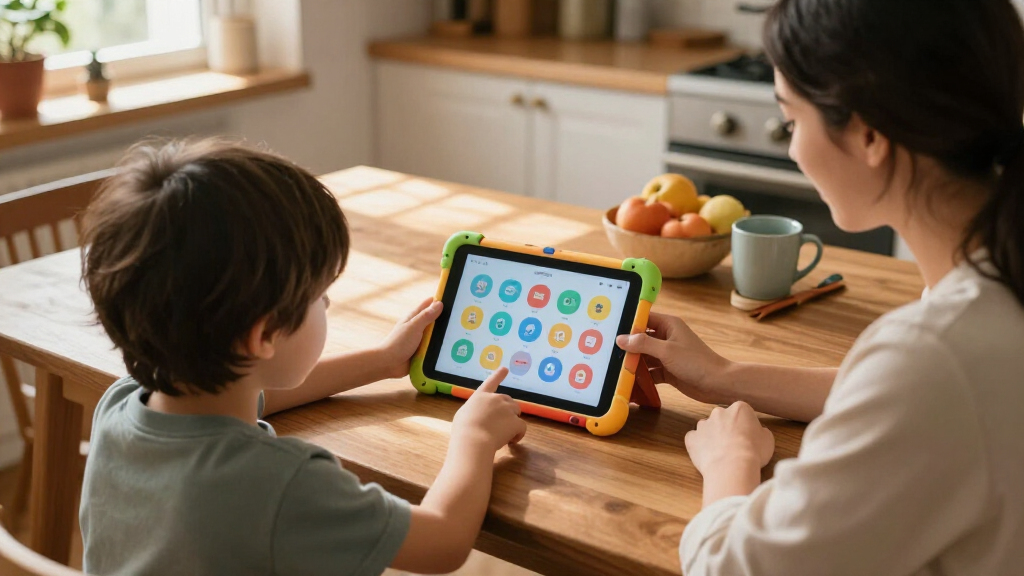

The right kids’ educational tablet balances three things that rarely coexist: genuinely educational software, dependable parental controls, and hardware that survives being dropped off a couch. My top pick overall is the LeapFrog LeapPad Academy, because its built-in learning curriculum is designed by educators rather than simply bundled with a generic app store. If budget is the main constraint, the Amazon Fire 7 Kids Tablet delivers a polished content ecosystem with a replacement-warranty kid-proof case for less than most competitors, while the COLORROOM Android 15 Kids Tablet makes sense for families who want full Android flexibility with modern hardware. The core tradeoff in this category is curated safety versus open versatility: closed learning tablets limit content but guarantee age-appropriate material, while Android-based models offer more room to grow but demand more parental setup. Read on for the full ranked breakdown.

Turn the school run and nap time into listening time
- Thousands of audiobooks, podcasts and originals
- Listen on your phone, tablet or Echo — also offline
- Cancel anytime
Complete the kit


Key Takeaways
- Curriculum-backed tablets (amazon.com/dp/B07PLG93NS?tag=motherchronicle-20&ascsubtag=dc-692252″ target=”_blank” rel=”nofollow sponsored noopener”>LeapFrog LeapPad Academy) beat generic Android tablets on actual educational value, because the learning content is purpose-built rather than downloaded piecemeal.
- Several 7-inch budget Android models (Trayoo, YosaToo, HOTTABLET) are near-identical internally — the case quality and parental control software are what actually separate them.
- Amazon‘s Fire 7 Kids remains the strongest value play thanks to its content subscription, two-year worry-free replacement guarantee, and mature parental control suite.
- Toddler-focused toys like the Hahaland 5-Language Tablet and LeapFrog 2-in-1 LeapTop Touch are not real tablets at all — they’re better first devices for ages 1-4 before a screen-based tablet makes sense.
- Big RAM and storage numbers (10GB, 1TB expansion) on budget Android tablets matter far less than battery life, screen quality, and whether the parental controls actually work well day to day.


| kids’ educational tablet | Display | Processor | Storage |
|---|---|---|---|
| Amazon Fire 7 Kids Tablet | 7-inch touchscreen, 1024 x 600 | Quad-core 2.0 GHz | 16 GB (expandable up to 1 TB via microSD) |
| LeapFrog LeapPad Academy Kids’ | 7-inch shatter-safe screen | — | — |
| COLORROOM 2026 Android 15 Kids | 10.1-inch HD (1280 x 800), anti-blue light | Octa-core Unisoc T606, 2 GHz | 64 GB, expandable to 1 TB via microSD |
| Aiprotablet Kids Tablet | 10-inch IPS, 1280 x 800, eye protection | T7280 octa-core, 2.2 GHz | 64 GB, expandable to 2 TB via microSD |
| Kids 7-inch Android Tablet wit | 7-inch IPS, 1024 x 600 | Quad-core, Android 12 | 32 GB, expandable to 512 GB via microSD |
| LeapFrog Mr. Pencil’s Scribble | — | — | — |
| EDDBNi Kids Tablet Android 10- | 10 inches | — | 64GB |
| Hahaland 5-Language Learning T | — | — | — |
| YosaToo Kids Tablet 7-inch | 7 inches | Rockchip 1.5GHz | 32GB (expandable to 64GB) |
| Trayoo Kids Tablet 7 Inch Todd | 7-inch HD (1024 x 600) | Quad-core 1.6GHz | 32GB (expandable to 64GB) |
| EDDBNi Kids Tablet 10 inch And | 10 inches | VIA quad-core, 1.3 GHz | — |
| HOTTABLET Kids Tablet 7 inch A | 7 inches | — | — |
| Kids Tablet | 7 inches | — | — |
| Amazon Fire 7 Kids Tablet | 7-inch, 1024 x 600 | Quad-core 2.0 GHz, 2GB RAM | 16GB (expandable to 1TB microSD) |
| LeapFrog 2-in-1 LeapTop Touch | — | — | — |
More Details on Our Top Picks
Amazon Fire 7 Kids Tablet, 7-inch, 16 GB, Blue
This option stands out for its all-included content package — a full year of Amazon Kids+ means books, games, and shows are ready the moment it leaves the box, with no extra purchases in year one. Compared with the LeapFrog LeapPad Academy, the Fire 7 trades LeapFrog’s tightly focused curriculum for a much broader (if less strictly educational) library, which matters if your child’s interests vary week to week. The kid-proof case and two-year worry-free replacement tradition make it the safest bet for destructive toddlers. The tradeoff is hardware: a modest quad-core chip, only 16 GB of internal storage (about 9.5 GB usable), and a low-resolution screen. You’ll want a microSD card early, and it lags behind the COLORROOM for anything demanding.
Pros:- 1-year Amazon Kids+ subscription included with thousands of books, apps, and shows
- Sturdy kid-proof case built for drops and spills
- Up to 10 hours of battery life
- Robust parental controls via the Amazon Parent Dashboard
Cons:- Only 16 GB internal storage, with some apps refusing to install to microSD
- Low-resolution 1024 x 600 display and dated hardware
- Roughly 4-hour recharge time
Best for: Parents who want a complete, low-effort package with curated content and durability for children ages 3-7
Not ideal for: Families avoiding Amazon’s ecosystem or needing high performance — the storage and processor are entry-level
- Display:7-inch touchscreen, 1024 x 600
- Processor:Quad-core 2.0 GHz
- RAM:2 GB
- Storage:16 GB (expandable up to 1 TB via microSD)
- Battery Life:Up to 10 hours
- Weight:15.1 ounces (429 g)
- Included:Kid-proof case, USB-C cable, 1-year Amazon Kids+
Our verdict“If you want one purchase that covers content, protection, and controls for a young child, this is the easiest starting point in the lineup.”
LeapFrog LeapPad Academy Kids’ Learning Tablet, Green
Where the Amazon Fire 7 Kids throws everything at the wall, the LeapPad Academy takes the opposite approach: over 20 built-in learning apps designed by educators specifically for ages 3-8. This makes it the strongest pick here for actual curriculum-style learning — letter recognition, early math, writing practice with the included stylus. The shatter-safe screen and bumper with kickstand feel purpose-built rather than adapted from an adult tablet. The catch is the ecosystem: the best content beyond the preloaded apps sits behind a LeapFrog Academy subscription, and the hardware slows down with multiple apps open. Older kids will outgrow it fast, so it makes the most sense for the preschool-to-first-grade window rather than as a long-term device.
Pros:- 20+ preloaded educator-designed learning apps with no setup required
- Stylus and kickstand support writing practice and hands-on learning
- Shatter-safe screen with durable removable bumper
- Parental controls tailored to learning goals, not just screen limits
Cons:- Full content library requires a paid subscription after the free trial
- Noticeably slower with multiple apps open
- Short usable lifespan once kids pass age 8
Best for: Parents of 3-6 year olds who prioritize structured, educator-designed learning over general entertainment
Not ideal for: Kids 8 and up, or anyone wanting a versatile tablet for video streaming — the content ceiling is low and performance is modest
- Display:7-inch shatter-safe screen
- Operating System:Android 10
- Age Range:3-8 years
- Battery:Rechargeable lithium-ion
- Included:Bumper with kickstand, stylus, USB-C cable, wall adapter
- Warranty:2-year limited
Our verdict“This pick makes the most sense for families who see the tablet as a learning tool first and want age-appropriate, curriculum-backed content out of the box.”
COLORROOM 2026 Android 15 Kids Tablet, 10.1-inch, Octa-core, 10GB+64GB+1TB Expand, Parental Control, Big Battery, Pink
For raw hardware, nothing else in this batch comes close. An octa-core T606 processor, 10 GB of RAM, and Android 15 mean this tablet will still feel responsive in three years — a real advantage over the Amazon Fire 7 Kids, whose quad-core chip already shows its age. The 10.1-inch anti-blue-light display is also the largest here, which helps for drawing apps, e-books, and split-screen learning games. Google Kids Space provides curated educational content without a mandatory subscription, unlike the LeapPad Academy. The compromises are typical of budget big-screen tablets: expandable storage needs a separately purchased microSD card, the 1280 x 800 resolution is merely adequate at this size, and realistic battery life lands below the advertised 8-12 hours during video playback.
Pros:- Octa-core processor with 10 GB RAM keeps apps and games smooth
- Large 10.1-inch eye-friendly display with anti-blue-light filtering
- Google Kids Space with parental controls and no required subscription
- 6000mAh battery supports all-day intermittent use
Cons:- microSD card required to take advantage of the 1 TB expansion claim
- Resolution looks soft on a screen this large
- Less rugged protection than smaller kid-focused rivals
Best for: Families with kids 6+ who need a fast, future-proof tablet for learning apps, videos, and light multitasking
Not ideal for: Toddlers and rough-handlers — the 10.1-inch size is harder for small hands, and the included EVA case is thinner protection than the Fire 7’s kid-proof shell
- Display:10.1-inch HD (1280 x 800), anti-blue light
- Processor:Octa-core Unisoc T606, 2 GHz
- RAM:10 GB (4 GB + 6 GB extended)
- Storage:64 GB, expandable to 1 TB via microSD
- Battery:6000 mAh, 8-12 hours claimed
- Operating System:Android 15 with Google Kids Space
- Included:EVA case, USB cable, manual
Our verdict“Buy this if your child has outgrown toddler apps and you want hardware that won’t feel slow before middle school.”
Aiprotablet Kids Tablet, 10-inch Android Octa-Core Tablet with Case, 30GB RAM, 64GB Storage, Expandable 2TB, Parental Controls, Dual Camera, Bluetooth, WiFi, Keyboard, Mouse, Stylus, Pink
The standout here isn’t the tablet — it’s the full accessory bundle: keyboard, mouse, and stylus alongside the protective case. That transforms it from a toy into something closer to a learning workstation, well suited to kids practicing typing, drawing, or early homework tasks. Compared with the COLORROOM 2026, the Aiprotablet matches the octa-core performance claim and doubles the expansion ceiling (2 TB), while trading away the anti-blue-light focus and slightly newer software. Parents should read the 30 GB RAM figure skeptically — that’s a marketing sum of physical plus virtual memory, not true RAM. Battery life holds up for a school day at over 8 hours, but the accessories add clutter and pieces that younger children will lose or break.
Pros:- Keyboard, mouse, and stylus included for typing and creative learning
- Octa-core processor handles multiple educational apps smoothly
- microSD expansion up to 2 TB for years of apps and videos
- Parental controls with pre-installed educational content
Cons:- Advertised 30 GB RAM includes virtual memory and overstates real capacity
- Accessories are extra pieces to lose and of modest quality
- Battery drains faster under intensive use
Best for: Elementary-school kids (6-10) who can use a keyboard and mouse for typing practice, drawing, and educational apps
Not ideal for: Preschoolers — small detachable parts invite loss and breakage, and the accessories are wasted on a 3-year-old
- Display:10-inch IPS, 1280 x 800, eye protection
- Processor:T7280 octa-core, 2.2 GHz
- RAM:30 GB (combined physical + virtual)
- Storage:64 GB, expandable to 2 TB via microSD
- Battery Life:8+ hours use, 7 days standby
- Age Range:3+ (best for 6-10)
- Included:Case, keyboard, mouse, stylus
Our verdict“Choose this one when your child needs real school-adjacent tools — typing, stylus drawing, document basics — not just games and videos.”
Kids 7-inch Android Tablet with Parental Controls, 32GB, Shockproof Case, Pink
This is the lowest-frills option in the batch, and that’s its whole appeal. For families who want a secondary tablet — travel, waiting rooms, the back seat — it covers the basics: parental controls, a shockproof case with adjustable stand, pre-installed kids apps, and 32 GB of storage that outpaces the Amazon Fire 7 Kids at its base price. Unlike the Fire, there’s no bundled content subscription, so you’re relying on what’s preloaded plus free app downloads. The honest tradeoffs: a quad-core chip that’s fine for casual apps but sluggish next to the COLORROOM’s octa-core, a basic 1024 x 600 screen, and — most notably — no published battery capacity or runtime, which makes it hard to plan around long trips without testing it yourself.
Pros:- Shockproof case with adjustable stand included at a low price
- 32 GB storage plus microSD expansion to 512 GB
- Parental controls for screen-time limits and content filtering
- Lightweight 7-inch size easy for small hands to hold
Cons:- No manufacturer-stated battery life or charging details
- Low-resolution display and modest quad-core performance
- No bundled content subscription like the Fire 7 Kids includes
Best for: Budget-conscious families wanting an affordable spare tablet for casual learning apps and travel entertainment for ages 3-9
Not ideal for: Anyone who needs dependable battery life for long trips or smoother performance for video-heavy apps — the specs here are entry-level and unverified
- Display:7-inch IPS, 1024 x 600
- Processor:Quad-core, Android 12
- RAM:4 GB
- Storage:32 GB, expandable to 512 GB via microSD
- Cameras:2 MP front, 2 MP rear
- Connectivity:Wi-Fi, Bluetooth
- Included:Shockproof case, adjustable stand
Our verdict“A sensible cheap-and-cheerful choice for a backup device, as long as you accept unverified battery life and basic performance.”
LeapFrog Mr. Pencil’s Scribble Write and Read
Most picks in this roundup are full Android tablets, but Mr. Pencil takes the opposite approach: a single-purpose device that teaches letter formation and early reading without apps, ads, or app-store rabbit holes. Kids trace uppercase and lowercase letters, practice numbers, and even learn to write their own name, with animated feedback that rewards correct strokes. Compared with the Hahaland tablet, which covers broad toddler vocabulary, this LeapFrog option goes deeper on one skill — handwriting — which matters for preschool readiness. The tradeoff is real: no videos, no expandable content, and it will be outgrown once a child writes confidently. Demo batteries mean an extra purchase on day one.
Pros:- Step-by-step guided letter tracing builds real handwriting skills
- Name personalization makes practice feel personal
- No apps, ads, or subscriptions to manage
- Dedicated focus avoids the distraction of general-purpose tablets
Cons:- Content limited to basic writing and early literacy
- Requires 3 AA batteries, and included ones are demo-only
Best for: Parents of 3-to-5-year-olds who want focused handwriting and phonics practice without screen-time battles
Not ideal for: Families wanting a long-lived multi-purpose device — the content ceiling is low once writing basics are mastered
- Ages:3+ years
- Power:3 AA batteries
- Focus:Handwriting, letters, numbers, phonics
- Personalization:Child’s name practice
- Content Type:Built-in, no downloads required
Our verdict“Buy this as a targeted preschool writing tutor, not a tablet replacement — and expect it retired by kindergarten.”
EDDBNi Kids Tablet Android 10-inch
If most budget kids’ tablets cluster around 7 inches, the EDDBNi K10 doubles down on screen real estate with a 10-inch display — a genuine advantage for drawing apps, e-books, and split-screen learning games. With 64GB of storage and 6GB of RAM claimed, it out-specs the 7-inch YosaToo on paper, though the suggests real-world performance doesn’t always match the spec sheet. Compared with the Trayoo’s well-documented 8-hour battery, EDDBNi provides almost no battery information, which makes travel planning a guessing game. The included protective case softens the risk of a big glass panel in kid hands. This pick makes sense when screen size matters more than polish — larger children watching lessons or sketching benefit most.
Pros:- 10-inch display is rare at this price and great for visual learning
- 64GB storage holds plenty of offline content
- Protective case included
- Dual cameras enable video calls with grandparents
Cons:- Battery capacity and runtime not documented
Best for: Budget-conscious families who want a large canvas for video lessons, drawing, and reading apps
Not ideal for:
- Display:10 inches
- RAM:6GB
- Storage:64GB
- Connectivity:2.4G Wi-Fi
- Cameras:Dual cameras
- Included:Tablet, protective case
Our verdict“The most screen per dollar here, but accept some quality-control risk in exchange for the size.”
Hahaland 5-Language Learning Tablet Toy
For parents of one-year-olds, an Android tablet like the YosaToo is simply overkill — and that’s exactly the gap the Hahaland tablet-toy fills. It’s a button-and-sound learning board with 90+ modules covering animals, shapes, letters, numbers, and more, offered in five languages including French, Spanish, and German. That multilingual angle is unique in this lineup: nothing else here introduces a second language at all, let alone four. Compared with Mr. Pencil, it trades depth for breadth — recognition instead of writing — which suits younger children better. The zero-screen design means no parental-control setup, no Wi-Fi, and nothing to break beyond sturdy BPA-free plastic. The ceiling is low; by age three or four most kids will be ready to graduate to a real tablet.
Pros:- Five-language exposure unique among every option in this roundup
- 90+ interactive modules build vocabulary and recognition
- Screen-free design eliminates blue-light and content worries
- Durable BPA-free plastic survives toddler handling
Cons:- Educational content stays at a basic recognition level
- Battery requirements not clearly specified
Best for: Bilingual or multilingual families with toddlers aged 1-3 who want screen-free early learning
Not ideal for: Preschoolers and up — the content depth caps out well before a 4-year-old’s curiosity does
- Age Range:12 months+
- Modules:90+ interactive activities
- Languages:English, French, Spanish, German, Italian
- Material:BPA-free ABS plastic
- Design:Lightweight, portable, screen-free
Our verdict“The smart first learning device for toddlers — especially multilingual households — before any real screen enters the picture.”
YosaToo Kids Tablet 7-inch
The YosaToo stands out in this roundup for its shockproof silicone case and travel-first design — the rugged build feels aimed squarely at backpacks, car seats, and airplane tray tables. It runs full Android 16 with Google Play access, preloaded educational apps, and drawing tools, giving parents far more flexibility than a locked-down toy like Mr. Pencil. Compared with the Trayoo, the YosaToo doubles the RAM (4GB vs 2GB), which means smoother app switching — but the Trayoo fights back with a documented 8-hour battery, while YosaToo publishes almost no runtime figures. A 30-day replacement policy plus lifetime tech support is better after-sales backing than EDDBNi offers. Screen resolution and camera quality are unstated, so don’t expect crisp video calls.
Pros:- Shockproof silicone case handles real kid-level abuse
- Full Android with Google Play grows with the child
- Preloaded offline learning apps work without Wi-Fi
- 30-day replacement plus lifetime tech support
Cons:- Battery life not documented by the manufacturer
- Screen resolution and camera quality unspecified
Best for: Families who travel often and need a rugged, app-flexible tablet that survives drops and road trips
Not ideal for: Buyers who need guaranteed all-day battery — the missing runtime specs make long-haul trips a gamble
- Display:7 inches
- Operating System:Android 16
- RAM:4GB
- Storage:32GB (expandable to 64GB)
- Processor:Rockchip 1.5GHz
- Warranty:30-day replacement/refund, lifetime tech support
Our verdict“The best-built traveler here — pick it for durability and app freedom, not for spec transparency.”
Trayoo Kids Tablet 7 Inch Toddler Learning Tablet
The Trayoo is the most honest spec sheet in the budget tier: a confirmed HD 1024 x 600 screen, Android 11, and a 5000mAh battery rated for roughly 8 hours — numbers that competitors like EDDBNi and YosaToo don’t even publish. That transparency makes it the safest default choice for a first real tablet. Compared with the YosaToo, its 2GB of RAM is half the memory, so heavy multitasking stutters more, but the documented all-day battery matters more for most kids’ use patterns. Offline-capable preloaded apps mean learning content works without Wi-Fi, useful since some users report spotty Wi-Fi connectivity — the pick’s most recurring complaint. The durable case and expandable storage round out a package that’s modest but reliable where it counts.
Pros:- Documented ~8-hour battery life from a 5000mAh cell
- HD 1024 x 600 resolution is confirmed, unlike several rivals
- Preloaded educational apps work fully offline
- Expandable storage up to 64GB
Cons:- Only 2GB of RAM limits performance under load
- Some users report Wi-Fi connectivity issues
Best for: First-tablet buyers who want proven battery life and clear specs at a budget price
Not ideal for: Power users or older kids running demanding apps — 2GB of RAM limits multitasking headroom
- Display:7-inch HD (1024 x 600)
- Processor:Quad-core 1.6GHz
- RAM:2GB
- Storage:32GB (expandable to 64GB)
- Battery:5000mAh, approx. 8 hours
- Operating System:Android 11
- Connectivity:Wi-Fi, Bluetooth
Our verdict“The sensible default budget pick — fewer surprises on paper, fewer excuses needed at bedtime.”
EDDBNi Kids Tablet 10 inch Android with Case, Quad-Core, 64GB, Dual Camera, Parental Controls, Educational
Most tablets in this lineup settle for a 7-inch display, but the EDDBNi K10 goes bigger, and that size difference genuinely matters for its target audience. Toddlers and preschoolers interacting with educational apps benefit from larger touch targets and bigger visuals, which reduces frustration compared with smaller options like the HOTTABLET 7-inch. The 64GB of onboard storage also outpaces the 16GB on Amazon’s Fire 7 Kids, meaning less reliance on microSD cards from day one. The tradeoff is raw power: a 1.3GHz quad-core chip is modest even by kids’ tablet standards, so graphically rich apps may load slowly. Compared with the COLORROOM Android 15 tablet’s octa-core processor, this model is better suited to simple learning apps than to streaming-heavy households.
Pros:- Large 10-inch display is easier for toddlers to interact with
- 64GB storage holds plenty of apps without expansion
- Protective case and parental controls included
- 8MP rear camera with 1080p video outclasses most kids’ tablets
Cons:- Underpowered 1.3GHz processor struggles with intensive apps
- Battery specs are vague, making it hard to plan for travel use
Best for: Parents of toddlers and little kids who want a large, forgiving screen for early learning apps without managing storage
Not ideal for: Families whose kids play demanding games or stream video constantly — the processor will feel sluggish
- Display:10 inches
- Processor:VIA quad-core, 1.3 GHz
- Memory:6GB RAM, 64GB ROM
- Camera:8MP rear, FHD 1080p video
- Age Range:Toddler, Little Kid
- Warranty:30-day return policy
Our verdict“A solid pick if screen size and storage top your list, but temper expectations on performance.”
HOTTABLET Kids Tablet 7 inch Android, 4GB RAM, 32GB ROM, 1TB Expansion, Parental Control, WiFi, Bluetooth, Dual Camera, Pink
Where the EDDBNi K10 wins on screen size, the HOTTABLET 7-inch wins on endurance, with up to 8 hours of mixed use from its 3000mAh battery. That puts it ahead of the similarly sized kickstand tablet from the same price bracket, which is rated closer to 6 hours, and makes it the better companion for car rides or flights. Running Android 12 out of the box is another advantage — several budget competitors ship older software that limits which educational apps will install cleanly. The 1TB microSD ceiling is generous, though 32GB of internal storage fills up quickly once kids discover video apps. Camera quality (2MP front, 5MP rear) is serviceable but lags behind the EDDBNi’s 8MP shooter. The pink silicone case is genuinely drop-resistant, but the color choice will divide siblings.
Pros:- Up to 8 hours of battery life leads this price class
- Modern Android 12 with full Google app compatibility
- 1TB expandable storage adds long-term flexibility
- Kid-proof silicone case absorbs drops
Cons:- Low-resolution cameras are fine for video calls only
- 32GB internal storage fills quickly before adding a microSD
Best for: Parents who need long battery life for travel at a low price point, especially for a single child
Not ideal for: Households wanting a neutral-color shared device or decent photo quality from the cameras
- Display:7 inches
- Operating System:Android 12.0
- Memory:4GB RAM, 32GB storage
- Expandable Storage:Up to 1TB microSD
- Battery:3000mAh, up to 8 hours mixed use
- Connectivity:WiFi, Bluetooth, USB Type-C
Our verdict“The pick when screen time away from an outlet is the priority and the budget is tight.”
Kids Tablet, 7 inch Android Tablet for Kids with Parental Controls, 4GB+32GB, Supports 1TB Expansion, Shockproof Case, Dual Cameras, Bluetooth, WiFi6, Kickstand
The standout feature here isn’t the hardware — it’s the built-in kickstand on the shockproof case. Compared with the HOTTABLET 7-inch, which requires propping or holding, this model lets a child watch lessons or follow along with drawing apps completely hands-free, which is a real advantage during mealtimes or craft sessions. It also steps ahead with WiFi6 support, giving it faster, more stable connections on modern routers than most budget rivals. The pre-installed iWawa educational suite means the tablet works as a learning device out of the box rather than requiring parents to curate apps, unlike a bare Android tablet. Battery life is the weak point: roughly 6 hours trails the HOTTABLET’s 8, so it’s less suited to all-day travel. Age suitability starts at 3, excluding the youngest toddlers that the EDDBNi K10 targets.
Pros:- Kickstand-equipped shockproof case enables hands-free use
- WiFi6 delivers faster, more reliable streaming
- iWawa educational content is pre-installed and parent-managed
- 1TB microSD expansion keeps content library growth cheap
Cons:- Around 6 hours of battery life trails category leaders
- Pre-installed apps may need updates before first use
Best for: Families who want ready-to-go educational content and hands-free video watching for kids aged 3 and up
Not ideal for: Toddlers under 3, or parents who plan long outings without a charger
- Display:7 inches
- Memory:4GB RAM, 32GB storage
- Expandable Storage:microSD up to 1TB
- Battery:3000mAh, up to 6 hours
- Connectivity:Bluetooth, WiFi6
- Pre-installed Software:iWawa educational content
- Case:Shockproof with kickstand
Our verdict“A practical choice when educational software should be ready at first power-on and a kickstand fits how your child actually uses a tablet.”
Amazon Fire 7 Kids Tablet (Newest Model) – 7″ Screen, 16 GB, Blue
What separates the Fire 7 Kids from every generic Android tablet in this roundup is the content, not the hardware. The included 6-month Amazon Kids+ subscription delivers ad-free books, games, and videos curated by age — a library that would take weeks to assemble manually on the HOTTABLET or kickstand tablets. Parental controls are the most polished in the category, with granular time limits and content filters accessible from a parent’s own device. With up to 10 hours of battery life, it also outlasts the 6-to-8-hour Android competitors. The compromises are real though: 16GB of internal storage (only ~9.5GB usable) demands a microSD card almost immediately, and the Kids+ subscription auto-renews at $7.99/month after the trial, which quietly raises the long-term cost above its sticker price. Amazon’s appstore also lacks some Google Play titles.
Pros:- 6 months of ad-free Amazon Kids+ content included
- Industry-leading parental controls with remote management
- Up to 10 hours of battery life leads the roundup
- Kid-proof case backed by Amazon’s 2-year worry-free guarantee tradition
Cons:- 16GB internal storage fills up almost immediately without a microSD card
- Kids+ subscription auto-renews at $7.99/month after the trial
- Amazon Appstore lacks some apps available on Google Play Android tablets
Best for: Parents who value a curated, ad-free content library and best-in-class parental controls over raw specs
Not ideal for: Budget-conscious families who won’t monitor the auto-renewing subscription, or those needing specific Google Play apps
- Display:7-inch, 1024 x 600
- Processor:Quad-core 2.0 GHz, 2GB RAM
- Storage:16GB (expandable to 1TB microSD)
- Battery Life:Up to 10 hours
- Cameras:2MP front and rear, 720p video
- Age Range:3-7 years
- Connectivity:Dual-band WiFi, Bluetooth, USB-C
Our verdict“Buy it for the content ecosystem and parental controls, and set a subscription reminder for month six.”
LeapFrog 2-in-1 LeapTop Touch
The LeapTop Touch plays a completely different game than everything else here. It’s not an Android tablet competing with the Fire 7 Kids — it’s a closed-system learning toy with no app store, no ads, no internet, and no accidental purchases. The swiveling 2-in-1 design flips between a laptop with an A-Z keyboard and a touch tablet, teaching letter recognition and typing alongside ABCs, numbers, and music modes aimed squarely at ages 2-5. Compared with the Fire 7 Kids, which targets 3-7 and requires active parental management, this needs essentially zero supervision. The tradeoffs are hard limits: content is finite, children age out of it quickly, and the small screen isn’t for extended viewing. Running on 3 AA batteries means ongoing replacement costs that a rechargeable Android tablet avoids entirely.
Pros:- No internet, ads, or in-app purchases — completely safe unsupervised use
- 2-in-1 laptop/tablet design builds keyboard familiarity early
- Multiple learning modes covering letters, numbers, music, and role-play
- Extremely durable with no setup or parental configuration needed
Cons:- Runs on AA batteries requiring frequent replacement
- Fixed content library means children outgrow it within a couple of years
Best for: Parents of 2-5 year olds who want a zero-risk introduction to letters and numbers with no screen-time management required
Not ideal for: Kids over 5, or anyone wanting app-based content, video streaming, or growth over multiple years
- Age Range:2-5 years
- Design:2-in-1 laptop-to-tablet with swiveling screen
- Learning Modes:ABCs, numbers, music, messages
- Keyboard:A-Z letter keyboard
- Power:3 AA batteries
- Model Number:80-600900
Our verdict“The right first device for preschoolers when you want pure learning value and total peace of mind rather than a real tablet.”
How We Picked
I evaluated each product through the lens a parent actually uses: what does this tablet teach, how well can I control it, and will it last. Educational content quality carried the most weight — a tablet with a structured, age-appropriate curriculum ranked above one with raw hardware specs but a generic app library. Parental controls were judged on usability as much as features, since time limits and content filters that are annoying to manage simply stop being used after a few weeks. Durability, battery life, screen size relative to the child’s age, and total cost of ownership (including content subscriptions and case replacements) rounded out the scoring.
Ranking also reflected who each product is for. Toddler learning toys ranked on engagement and developmental fit, not specs. Full Android tablets had to justify their extra flexibility with reliable controls and hardware that won’t feel slow within a year. This is why a modest-spec device like the Fire 7 Kids can outrank tablets with triple its storage — the overall experience, not the spec sheet, determined placement.
Factors to Consider When Choosing Kids’ Educational Tablet
Before picking a specific model, it helps to understand what actually drives satisfaction with a kids’ tablet — and where parents most often go wrong.Age-Appropriateness Beats Specs Every Time
The single most common mistake is buying a tablet designed for a different developmental stage than your child is in. Toddlers ages 1-4 do better with button-based learning toys like the Hahaland language tablet or LeapTop Touch, which build fine motor skills without the passive scrolling a touchscreen encourages. Ages 4-8 are the sweet spot for closed learning tablets like the LeapPad Academy, where guided curriculum matters more than app freedom. Ages 8 and up typically outgrow curated content and chafe against restrictions, which is when a full Android tablet or Fire device with adjustable controls becomes the better fit. Buying above a child’s age means wasted capability; buying below it means the tablet gets abandoned within months.
Closed Ecosystems vs. Open Android
This is the decision that shapes everything else. Closed learning tablets (LeapFrog) come with pre-approved educational content, no inappropriate app downloads, and almost no setup burden — the tradeoff is a limited library your child will eventually exhaust. Open Android tablets (COLORROOM, Aiprotablet, EDDBNi) can grow with your child for years and support any learning app your school recommends, but they shift the policing burden onto you: filters to configure, app stores to gate, screen time to enforce. Amazon’s Fire platform sits in the middle with a curated kids’ mode layered over an Android base. Parents who underestimate the setup work on open tablets often end up handing kids unrestricted access by default.
The Subscription Cost Hidden in the Price
The sticker price rarely tells the whole story. Amazon Fire Kids tablets include a year of kids’ content access, but renewal after that adds a recurring cost that can exceed the tablet’s price within two years. LeapFrog’s curriculum is largely included upfront, which makes its higher purchase price cheaper over a three-year horizon. Budget Android tablets look like bargains until you factor in paid learning apps — quality educational subscriptions can run $5-10 monthly per child. Calculate total two-year cost, not shelf price, and the ranking of “cheap” versus “expensive” models often inverts.
Durability: Case Design Matters More Than Marketing
Every kids’ tablet claims to be durable; very few earn it. The best protection is a thick silicone bumper with raised edges that keeps the screen off the floor when dropped face-down, plus a kickstand or handle that doubles as a grip for small hands. Amazon’s kid-proof case with its two-year replacement guarantee is the industry benchmark here. Generic Android tablets vary widely — some ship with cases that are rigid and crack on the first drop. Also check whether the charging port is recessed, since frayed cables and broken ports are the most common real-world failure point, not shattered screens.
Screen Size and Weight for Small Hands
A 10-inch screen sounds better on paper, but for children under seven it often means a tablet too heavy to hold comfortably in one hand, which leads to drops and to it being propped up passively rather than used interactively. Seven-inch tablets are the right size for most kids ages 3-8; the 10-inch class makes sense for older kids doing reading apps, homework, or video lessons. Weight matters as much as dimensions — anything over about a pound with its case becomes a lap-only device. Also weigh battery life against usage: a tablet used mainly at home can live on a charger, but travel use demands 8+ hours of real-world runtime.
Ignore Inflated Spec Numbers
Marketing like “10GB RAM” or “1TB expandable storage” on budget kids’ tablets deserves skepticism. Some manufacturers count virtual memory alongside physical RAM, and no child will ever come close to filling a 1TB card — the spec exists to win search comparisons. What actually affects daily experience is processor generation, screen resolution, and battery quality, none of which are prominently advertised on cheap models. A quad-core budget chip will struggle with video calls and laggy animations that frustrate kids into abandoning educational apps. Read reviews for real-world performance complaints rather than trusting spec-sheet arithmetic.
Frequently Asked Questions
Is a dedicated kids’ tablet better than just using parental controls on my own tablet?
For children under about eight, a dedicated device is usually the better call. Kids’ tablets come with rugged cases, curated content, and built-in time management, so you’re not constantly configuring profiles or worrying about your child wandering into your email and purchases. Handing over a personal tablet also means sharing battery life and availability, which creates daily friction. That said, if your budget only allows one device, Amazon’s Fire Kids tablets are inexpensive enough that choosing between them and sharing an adult tablet becomes a false dilemma for most families.
What age is too young for a tablet, and should I start with a toy version instead?
Most pediatric guidance suggests limiting screen exposure before age two, and that’s where products like the Hahaland 5-Language Tablet and LeapFrog 2-in-1 LeapTop Touch fill a real gap. These are button-press learning toys, not screens — they teach letters, sounds, and cause-and-effect without the passive watching a touchscreen invites. If your child is between one and three, starting with one of these delays the screen habit while still building pre-reading skills. A real tablet typically makes sense around age four, when children can follow guided curriculum like the LeapPad Academy’s.
Do I need to pay for a content subscription after buying the tablet?
It depends on the platform, and this is where hidden costs catch parents off guard. Amazon Fire Kids tablets include one year of kids’ content, after which the subscription renews annually — a cost that can exceed the tablet’s price over two or three years. LeapFrog devices ship with most educational content included, so there’s little ongoing expense. Generic Android tablets have no included content at all, so you’ll either rely on free apps or add one or more paid learning subscriptions. Budget for the full ownership period, not just checkout.
Are cheap 7-inch Android kids’ tablets under $60 worth buying?
They can be, if you pick carefully, because many are essentially the same hardware in different cases. Models like the YosaToo, HOTTABLET, and Trayoo share similar internals, so the real differences are case durability, parental control software quality, and warranty support. A good one makes a fine first tablet or travel device for a young child; a bad one delivers a sluggish screen that frustrates kids and breaks within months. Check reviews specifically for lag complaints and case quality, and don’t pay extra for inflated specs like 1TB expansion that no child will use.
How much parental control do I actually get, and how hard is it to set up?
Control quality varies more than any other feature in this category. Amazon and LeapFrog offer the most mature systems — per-child profiles, time limits by category, and content filters that take minutes to configure. Generic Android tablets typically use Google Family Link or a pre-installed parental app, which works but requires more initial setup and occasional maintenance as kids discover workarounds. The honest tradeoff: stronger controls usually mean a more closed ecosystem. If you want full Android flexibility, expect to spend an hour upfront configuring filters and revisiting settings every few months.
Conclusion
For most families, the LeapFrog LeapPad Academy is my best overall pick — its educator-designed curriculum and zero-setup safety make it the strongest pure learning tablet in the lineup. Best value goes to the Amazon Fire 7 Kids, whose included content year, replacement guarantee, and mature parental controls deliver more real-world usefulness per dollar than any budget Android rival. Families wanting room to grow should look at the COLORROOM Android 15 Kids Tablet as the best premium-leaning option, with modern hardware and controls that suit kids aged eight and up.
For beginners and younger children, the LeapFrog 2-in-1 LeapTop Touch and Hahaland language tablet are smarter first devices than any screen, bridging to a real tablet around age four. Budget-conscious buyers who still want a full tablet get solid options in the YosaToo or Fire 7 Kids, depending on whether they prefer open Android or a curated ecosystem. Match the pick to your child’s age and your willingness to manage settings, and the right choice from this list becomes obvious.
Halloween Picks
halloween
As an affiliate, we earn on qualifying purchases.