If you are shopping for an Apple device for a child in 2026, the honest answer is that an iPad is almost always the right call — it is the only Apple device with meaningful parental controls, a huge library of age-appropriate apps, and a price range that actually works for families. The real question is which iPad. My top pick is the Apple iPad 11-inch (A16, Pink), which combines the fastest chip Apple offers at this price with a screen and camera setup that will stay relevant through years of schoolwork and gaming. For tighter budgets, the renewed iPad 8th Generation covers the basics for a fraction of the cost, while the silver 11-inch A16 iPad lands in between as the sensible all-rounder for families who want modern hardware without overbuying.

Turn the school run and nap time into listening time
- Thousands of audiobooks, podcasts and originals
- Listen on your phone, tablet or Echo — also offline
- Cancel anytime
The tradeoffs come down to three things: performance headroom, storage capacity, and longevity versus price. The A16 models will handle everything a kid throws at them for years, but you pay for that runway. The renewed 8th-generation model is cheap enough that a cracked screen or a lost stylus will not ruin your week, yet its 32GB of storage and older A12 chip mean it will feel dated sooner. I walk through exactly who each one suits below.
Complete the kit


Key Takeaways
- The 11-inch A16 iPad in Pink is my top pick because its modern chip, 128GB of storage, and USB-C port give it the longest useful lifespan of the three.
- The silver 11-inch A16 iPad is the same hardware in a neutral color — pick it when you want identical performance for a lower-key look or shared family use.
- The renewed 8th-generation iPad is the budget fallback: fine for video watching, drawing, and homework, but 32GB of storage fills up fast once games and videos pile up.
- All three support Apple Pencil, but only the A16 models work with the newer USB-C Pencil and Magic Keyboard Folio, which matters for school productivity.
- Screen Time and Family Sharing work identically across all three, so parental controls should not drive your decision — performance and storage should.
| Apple iPad 11-inch (A16 chip, 128GB, Wi-Fi) – Pink |  | Best Overall | Display: 11-inch Liquid Retina with True Tone | Chip: Apple A16 | Storage: 128GB | VIEW LATEST PRICE | See Our Full Breakdown |
| Apple iPad 11-inch (A16 chip, 128GB, Wi-Fi) – Silver |  | Best for Shared Family Use | Display: 11-inch Liquid Retina with True Tone | Chip: Apple A16 | Storage: 128GB (up to 512GB) | VIEW LATEST PRICE | See Our Full Breakdown |
| Apple iPad 10.2-inch, 8th Generation, Wi-Fi, 32GB, Silver (Renewed) |  | Best Budget Pick | Display: 10.2-inch Retina | Processor: A12 Bionic with Neural Engine | Storage: 32GB | VIEW LATEST PRICE | See Our Full Breakdown |
| Apple devices for kid | Display | Storage | Connectivity | Front Camera |
|---|---|---|---|---|
| Apple iPad 11-inch | 11-inch Liquid Retina with True Tone | 128GB | Wi-Fi 6, USB-C | 12MP Center Stage |
| Apple iPad 11-inch | 11-inch Liquid Retina with True Tone | 128GB (up to 512GB) | Wi-Fi 6, USB-C | 12MP Center Stage |
| Apple iPad 10.2-inch | 10.2-inch Retina | 32GB | Wi-Fi 5 (802.11ac), Lightning | 1.2MP FaceTime HD |
More Details on Our Top Picks
Apple iPad 11-inch (A16 chip, 128GB, Wi-Fi) – Pink
This is the pick I would hand to most kids between roughly 8 and 14, and the reasoning is simple: the A16 chip buys years of headroom. Games like Roblox and Minecraft, video editing in iMovie, and Split View multitasking for homework all run smoothly today, and that performance cushion means the tablet will still feel responsive when your child is two grades older. Compared with the renewed 8th-generation model in this lineup, the gap is generational — newer chip, faster Wi-Fi 6, USB-C charging that matches whatever else is in your backpack, and four times the base storage.
The 12MP Center Stage front camera is a genuinely kid-relevant feature rather than a spec-sheet bullet, because it keeps your child framed during FaceTime calls with grandparents or group video projects without anyone fiddling with the camera. The pink finish is the differentiator against the otherwise-identical silver model — it is the one kids tend to ask for by name, and it makes the device feel personal rather than handed down. The Liquid Retina display with True Tone is easier on young eyes during evening reading sessions, and Touch ID keeps a child’s Apple Pay allowance purchases locked behind a fingerprint.
The tradeoffs are the ones that come with any current-generation Apple hardware: the Apple Pencil and Magic Keyboard Folio cost extra, which can sting if you planned to use this for schoolwork on day one, and storage tops out at 512GB — not a real issue for a kid, but worth knowing. Still, if I were buying one tablet to last through middle school, this is where my money would go.
Pros:- A16 chip delivers smooth gaming and years of performance headroom
- 128GB of storage is realistic for games, videos, and school files
- Center Stage front camera and 4K rear video are excellent for calls and creative projects
- USB-C charging works with modern cables and accessories
Cons:- Apple Pencil and Magic Keyboard Folio sold separately
- Pink finish is polaraling for kids who prefer neutral colors
- Current-generation pricing reflects its flagship-adjacent positioning
Best for: Kids ages 8 to 14 who game, video-chat, and will eventually use the tablet for schoolwork
Not ideal for: Families on a strict budget or buying a first tablet for a very young child at high risk of drops
- Display:11-inch Liquid Retina with True Tone
- Chip:Apple A16
- Storage:128GB
- Connectivity:Wi-Fi 6, USB-C
- Front Camera:12MP Center Stage
- Back Camera:12MP Wide, 4K video
- Security:Touch ID
- Battery:All-day battery life
- Accessory Compatibility:Apple Pencil (USB-C and 1st gen), Magic Keyboard Folio
Our verdict“The most future-proof Apple device for kids here, with the performance, storage, and camera setup to last through years of school and play.”
Apple iPad 11-inch (A16 chip, 128GB, Wi-Fi) – Silver
Hardware-wise, this is the same tablet as my top pick — identical A16 chip, display, cameras, storage, and accessory support — so the decision between them is purely about who uses it. The silver finish is the better choice when the iPad will live in a shared space or be handed between siblings, because it shows scuffs and fingerprints less visibly and carries none of the “that’s MY color” friction that a pink tablet can create between two kids. For a family device that parents will also borrow for recipes, email, and travel movies, the neutral finish just fits more households.
Where this model earns its separate spot is flexibility across ages. Because it supports both the USB-C Apple Pencil and the first-generation Pencil, plus the Magic Keyboard Folio, it grows with whoever is using it — a younger child can draw, a teenager can type essays, and a parent can manage the shopping list. Compared with the renewed 8th-generation iPad, the advantage is stark on two fronts: the A16 chip will still run demanding apps comfortably years from now, and the 128GB of base storage will not fill up the moment a child discovers video downloads for a road trip.
The honest downside is that it costs the same as the pink model while being slightly less exciting to unwrap, and like its sibling, it is really an incomplete purchase until you add a case — and possibly a Pencil. If you buy one tablet for the whole household rather than one child, this is the configuration I would choose.
Pros:- Same A16 performance and 128GB storage as the top pick in a neutral finish
- Shows wear and fingerprints less than darker or colored finishes
- Works with both Apple Pencil generations and the Magic Keyboard Folio
- Wi-Fi 6 and USB-C keep it compatible with modern home networks and cables
Cons:- No practical hardware advantage over the pink model
- Accessories sold separately add to the real cost
- Overkill for a very young child who mostly watches videos
Best for: Families buying one shared iPad, or kids who prefer a neutral look
Not ideal for: A child who specifically wants a colorful device, or buyers trying to minimize upfront spend
- Display:11-inch Liquid Retina with True Tone
- Chip:Apple A16
- Storage:128GB (up to 512GB)
- Connectivity:Wi-Fi 6, USB-C
- Front Camera:12MP Center Stage
- Back Camera:12MP Wide with True Tone flash, 4K video
- Security:Touch ID
- Battery:All-day battery life
- Color:Silver
Our verdict“Identical performance to my top pick with a finish that suits shared households better — pick by color and household dynamics, not specs.”
Apple iPad 10.2-inch, 8th Generation, Wi-Fi, 32GB, Silver (Renewed)
There is a version of buying a kid an Apple device where the tablet is essentially a disposable learning and entertainment tool — something for a five-year-old to watch shows on, scribble with a first-generation Apple Pencil, and play gentle educational games. For that scenario, this renewed 8th-generation iPad makes a lot of sense, because its low cost means a cracked screen or a juice-box spill is an annoyance rather than a small financial crisis. The 10.2-inch Retina display is still genuinely pleasant for video, and Touch ID works exactly as it does on the newer models.
But I want to be direct about the tradeoffs, because they are substantial. The 32GB of storage is the biggest constraint: after the operating system and a handful of apps, you will be managing space constantly, and offloading videos becomes a family chore. The A12 Bionic chip, while fine for streaming, drawing apps, and casual games, is several generations behind the A16 in the other two picks — newer apps run, but heavy games and video editing feel sluggish in comparison. It also uses Lightning instead of USB-C, so your newer household cables will not work with it, and the 1.2MP front camera is rough for video calls next to the 12MP Center Stage cameras on the current models.
Compared with the 11-inch A16 iPads, this is a different product philosophy: cheap and replaceable versus expensive and durable. It also ships as a renewed unit with a 90-day limited warranty, which is worth weighing if you want the peace of mind of full new-unit coverage. For a first tablet, a younger child, or a household where the iPad will be one of several screens, those compromises are reasonable ones.
Pros:- Lowest-cost entry into the Apple ecosystem for kids
- 10.2-inch Retina display is still excellent for video and drawing apps
- Supports Apple Pencil (1st generation) and Smart Keyboard for learning activities
- Up to 10 hours of battery life covers a full day of use
Cons:- 32GB of storage fills up quickly with games and downloaded videos
- A12 Bionic chip is several generations old and struggles with demanding apps
- Renewed condition with a Lightning port and only a 90-day limited warranty
Best for: Younger kids (4 to 8), first-tablet buyers, and families who want low financial risk
Not ideal for: Kids who game heavily, record video, or need the tablet to last through many school years
- Display:10.2-inch Retina
- Processor:A12 Bionic with Neural Engine
- Storage:32GB
- Connectivity:Wi-Fi 5 (802.11ac), Lightning
- Rear Camera:8MP
- Front Camera:1.2MP FaceTime HD
- Battery:Up to 10 hours, lithium-ion
- Condition:Renewed, 90-day limited warranty
Our verdict“A sensible low-risk first iPad for young kids, as long as you accept the storage and performance ceilings that come with the price.”
How We Picked
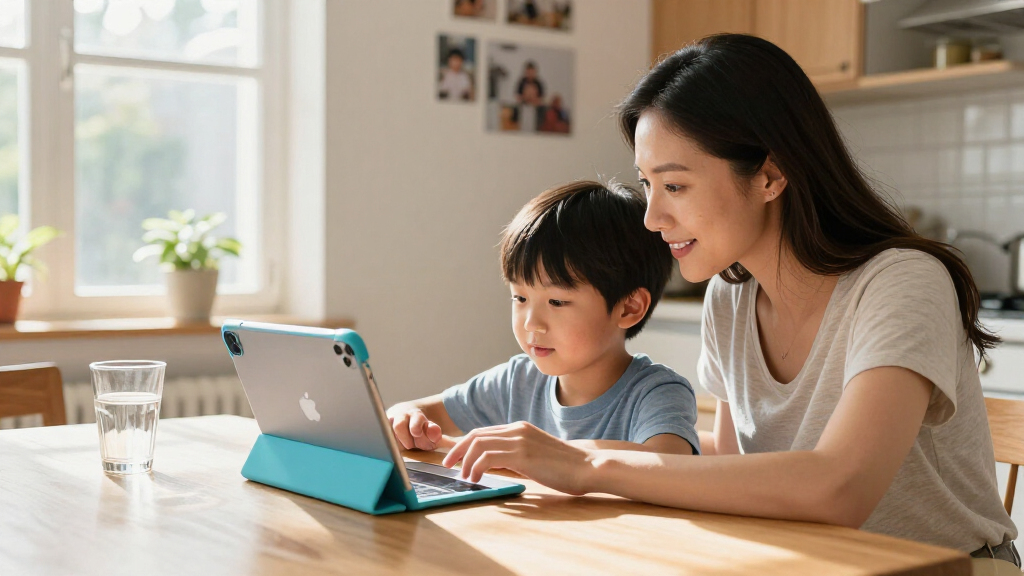
Since I could not test these devices side by side myself, I built this ranking around what actually matters when a child is the primary user. First, longevity: kids keep devices for years, and a chip that feels fast today can struggle with the apps of three years from now, so I weighted processor generation heavily. Second, storage reality: children’s devices accumulate game downloads, video projects, and school files faster than adult devices, so I treated 128GB as the practical floor and flagged the 32GB model accordingly. Third, repair-and-replace economics: a device a seven-year-old carries to school is a device that will eventually hit the pavement, which is why I included a renewed option despite its tradeoffs. Finally, I compared each model against its siblings in this lineup rather than in isolation, so the ranking reflects relative value for kids specifically — not raw specs.
| Apple devices for kid | Connectivity | Battery |
|---|---|---|
| Apple iPad 11-inch | Wi-Fi 6, USB-C | All-day battery life |
| Apple iPad 11-inch | Wi-Fi 6, USB-C | All-day battery life |
| Apple iPad 10.2-inch | Wi-Fi 5 (802.11ac), Lightning | Up to 10 hours, lithium-ion |
Factors to Consider When Choosing Best Apple Devices For Kids
Choosing an Apple device for a child involves a different calculus than buying for yourself. These are the factors I would weigh before clicking buy on any of the three picks above.Age and Expected Lifespan
A tablet for a five-year-old and a tablet for a thirteen-year-old are really different purchases. Younger kids are harder on hardware but easier on performance — they need durability and simple apps, which makes the renewed 8th-generation iPad a rational choice. Older kids need a device that can keep up with gaming, video projects, and eventually schoolwork, which points toward the A16 models. I recommend buying for the child’s needs two to three years from now, not just today, because replacing a too-slow tablet mid-school-year is more disruptive than spending a little more upfront.
Storage: The Hidden Decision
Storage is the spec parents most often underestimate. Kid tablets accumulate downloaded videos, games that grow with updates, and school projects, and unlike a laptop, you cannot easily add storage later. The 128GB base on the A16 models is comfortable; the 32GB on the renewed model means you will be deleting things within months of normal use. My guidance: 32GB only for a very young child with a handful of apps, and 128GB for everyone else.
Port and Accessory Compatibility
The A16 iPads use USB-C, which means one charger for the whole family’s modern devices and support for the current Apple Pencil. The 8th-generation iPad uses Lightning, an older standard, and works only with the first-generation Pencil and Smart Keyboard. If your child will use a stylus for drawing or a keyboard for schoolwork, check accessory compatibility before buying the tablet, because a mismatched Pencil generation is a common and frustrating mistake.
Parental Controls Are Equal Across the Board
One thing that should not drive your decision: Screen Time, Family Sharing, content restrictions, and app approval all work identically on all three models. You can set downtime limits, approve downloads remotely, and restrict explicit content the same way whether you buy the budget model or the premium one. Buy based on hardware and longevity, then configure parental controls the same way regardless of which tablet you choose.
Frequently Asked Questions
Which Apple device is best for a young child?
For children under about 8, I would lean toward the renewed 8th-generation iPad. At that age, the typical workload is streaming shows, playing simple educational games, and drawing with an Apple Pencil — all of which the A12 Bionic chip handles comfortably. The lower cost also removes most of the anxiety from handing an expensive object to someone who may drop it off a couch, and the 10.2-inch screen is a fine size for small hands. The main thing to accept is the 32GB storage limit, which you can manage by streaming rather than downloading videos and keeping the app library small.
Is a renewed iPad safe to buy for a kid?
A renewed iPad can be a smart purchase for a child precisely because kids are hard on devices, but you should go in with clear expectations. This model ships with a 90-day limited warranty, which is shorter than new-unit coverage, so the first three months are your window to catch any defects. Cosmetically, renewed units may show minor wear, though the screen and battery are typically inspected and functional. My suggestion is to set the tablet up fully within the return window — test charging, speakers, Touch ID, and battery life — so any problems surface while you still have easy recourse.
Is 32GB of storage really enough for a child’s iPad?
It depends heavily on how your child uses it, but for most kids the honest answer is no, not comfortably. Games, particularly the popular free-to-play ones kids gravitate toward, have grown dramatically in size, and a few large titles plus some downloaded videos can consume most of the usable space. If you choose the 32GB model, plan on streaming video instead of downloading, deleting apps between play sessions, and keeping photos backed up to iCloud. If your child downloads anything aggressively, the 128GB models will save you ongoing storage-management headaches.
Do both 11-inch A16 iPads perform the same?
Yes — the pink and silver 11-inch A16 iPads are functionally identical devices. They share the same A16 chip, 11-inch Liquid Retina display, 128GB of base storage, Wi-Fi 6, USB-C, cameras, and Touch ID. The only difference is the finish, so the choice between them is purely about preference and household context. Pink tends to be the pick when one child owns the device and is excited about the color; silver works better for shared family use or for kids who prefer a neutral look. There is no performance reason to pay any premium for one over the other.
What accessories should I plan to buy alongside a kid’s iPad?
The first purchase should always be a rugged case — ideally one with a protective bumper and raised edges, since drops are the number-one risk for kid-owned tablets. Beyond that, an Apple Pencil is worthwhile if your child enjoys drawing or will use handwriting apps, but note the generation matters: the A16 models support both the USB-C Pencil and the first-generation Pencil, while the 8th-generation iPad works only with the first-generation Pencil. A keyboard like the Magic Keyboard Folio or Smart Keyboard makes sense mostly for school-age kids who will type essays. Budget for at least the case on day one; the rest can come as needs emerge.
Conclusion
Here is how I would match these three devices to buyers. If you are buying for one child roughly 8 to 14 who games, video-calls, and will carry this tablet into schoolwork, get the pink 11-inch A16 iPad — it has the performance and storage to last for years, and it is the one kids are genuinely excited to own. If you are buying one iPad for the whole household or your child prefers a neutral look, the silver 11-inch A6 model delivers identical capability in a finish that fits shared spaces and shows wear less. And if you are buying a first tablet for a younger child — or you simply want the lowest possible financial risk attached to a device that might meet a staircase — the renewed 8th-generation iPad covers streaming, drawing, and educational apps well enough, provided you go in accepting its storage and speed limits.
Whatever you pick, two rules hold across the board: buy a case before the tablet leaves the house, and set up Screen Time and Family Sharing on day one — the parental controls are identical on all three, so you can protect your child’s habits and your wallet no matter which device you choose.
Fall Picks
fall essentials
As an affiliate, we earn on qualifying purchases.