The best 3D pen for most kids is the 3Doodler Start+ 3D Pen Set, which pairs kid-focused low-temperature plastic with an activity book for guided projects. For older children ready to work with standard PLA or ABS, the MYNT3D Super 3D Printing Pen offers more material flexibility, while the SCRIB3D Advanced Bundle stands out for its broad color selection. The main choice is between a simpler, lower-temperature experience for younger makers and hotter pens with more material and speed controls that call for closer adult supervision. Filament compatibility, age suitability, and whether a child benefits from templates or already has project ideas also separate these options. Read on for the full comparison and help matching a pen to your child.

Give the gift of listening to the whole family
- Choose a 1-, 3-, 6- or 12-month membership
- They pick the audiobooks they love
- Easy to send by email
Complete the kit


Key Takeaways
- The 3Doodler Start+ set is the clearest young-kid pick: its low-temperature plastic and activity book focus on guided, age-appropriate making rather than standard hot-nozzle filament.
- Most MYNT3D and SCRIB3D models suit older, supervised makers better: their PLA/ABS compatibility and adjustable controls offer flexibility, but add heat and setup considerations.
- Starter materials change the first-use experience: the MYNT3D Super Kit and SCRIB3D Advanced Bundle include more color variety than basic pen-and-starter-kit configurations.
- A display helps with control, not safety: the MYNT3D Professional and SCRIB3D P1 make settings easier to monitor, but their display does not remove the need for adult oversight.
- Choose the project support that matches the child: 3Doodler Start+ includes an activity book, while the 3Doodler Flow includes a stencil book and guide; neither replaces checking age guidance and material needs.
| MYNT3D Super 3D Printing Pen, Compatible with 1.75 mm ABS and PLA |  | Best for Material Flexibility | Compatible filament: 1.75 mm ABS and PLA | Extrusion speed: Stepless adjustable | Temperature: Adjustable | VIEW LATEST PRICE | See Our Full Breakdown |
| SCRIB3D Advanced 3D Printing Pen Kit |  | Best for Guided First Projects | Brand: SCRIB3D | Model: SCRIB_PEN_ADV | Filament: PLA | VIEW LATEST PRICE | See Our Full Breakdown |
| MYNT3D Professional 3D Printing Pen with OLED Display | 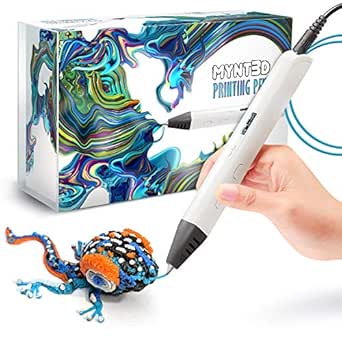 | Best for Fine Temperature Control | Display: OLED | Temperature range: Listed as 140–230 °C in 1-degree increments; other product details state 130–240 °C | Extrusion speed: Adjustable | VIEW LATEST PRICE | See Our Full Breakdown |
| 3Doodler Start+ 3D Pen Set with Activity Book for Kids 6+ |  | Best for Kid-Focused Project Guidance | Brand: 3Doodler | Model: Start+ | Recommended age: 6+ | VIEW LATEST PRICE | See Our Full Breakdown |
| MYNT3D Super 3D Pen Kit with 10-Color PLA Filament and DesignPad |  | Best for Color Variety and Tracing | Filament material: PLA | Filament diameter: 1.75 mm | Filament colors: 10 | VIEW LATEST PRICE | See Our Full Breakdown |
| 3Doodler Flow 3D Printing Pen with Filament, Stencil Book, and Guide |  | Best for Material Variety | Filament compatibility: 1.75 mm PLA, ABS, and wood | Display: Integrated LCD temperature monitoring | Included filament: 80 feet total in eight colors | VIEW LATEST PRICE | See Our Full Breakdown |
| 3Doodler Start+ Essentials 3D Pen Set for Kids, Ages 6+ |  | Best for Younger Beginners | Recommended age: 6 years and up | Filament: 3Doodler Start plastic | Included strands: 72 mixed-color plastic strands | VIEW LATEST PRICE | See Our Full Breakdown |
| SCRIB3D Advanced 3D Printing Pen Bundle with 20-Color PLA Refill Pack |  | Best for Long Project Sessions | Filament material: PLA | Filament diameter: 1.75 mm | Total filament length: 348 feet | VIEW LATEST PRICE | See Our Full Breakdown |
| SCRIB3D P1 3D Printing Pen with Display and Starter Kit |  | Best for Adjustable Drawing Control | Compatible filaments: PLA and ABS | Temperature range: PLA: 160–210°C; ABS: 210–235°C | Speed control: Stepless speed slider | VIEW LATEST PRICE | See Our Full Breakdown |
| 3D pens for kid | Weight | Warranty | Dimensions |
|---|---|---|---|
| MYNT3D Super 3D Printing Pen | 7.7 ounces | 1 year limited | 3.98 x 8.31 x 2.32 inches |
| SCRIB3D Advanced 3D Printing P | 11.7 ounces | 1 year | — |
| MYNT3D Professional 3D Printin | 12 ounces | 1-year limited | 7.99 x 5.2 x 2.6 inches |
| 3Doodler Start+ 3D Pen Set wit | — | — | — |
| MYNT3D Super 3D Pen Kit with 1 | — | 1-year limited | — |
| 3Doodler Flow 3D Printing Pen | 15.8 ounces | — | 3.1 x 10.74 x 4.44 inches |
| 3Doodler Start+ Essentials 3D | 10.72 ounces | 1 year against manufacturer defects | 9.06 x 6.02 x 2.56 inches |
| SCRIB3D Advanced 3D Printing P | — | — | — |
| SCRIB3D P1 3D Printing Pen wit | 12.9 ounces | 1 year | 4.61 x 7.87 x 1.97 inches |
More Details on Our Top Picks
MYNT3D Super 3D Printing Pen, Compatible with 1.75 mm ABS and PLA
The MYNT3D Super is the most adaptable choice here for families who want to work with both PLA and ABS, rather than stick to the PLA-only setup of the SCRIB3D Advanced. Its stepless speed control lets a child or parent adjust filament flow gradually, which can make it easier to manage simple lines and fills than a pen with fixed speed steps. The temperature control also allows adjustment for different filament types, though younger users will likely need adult help choosing settings. At 7.7 ounces, it is lighter than the SCRIB3D Advanced, a plus for shorter crafting sessions. The tradeoff is a relatively lean starter kit: only three filament colors are included, and the listing is inconsistent about whether those strands are PLA or ABS. I’d choose it for material choice, not for the most complete project bundle.
Pros:- Compatible with 1.75 mm PLA and ABS filament.
- Stepless extrusion-speed adjustment supports gradual control of filament flow.
- Adjustable temperature accommodates different filament types.
- Lightweight 7.7-ounce stylus-style design.
Cons:- The included three filament colors are described inconsistently as PLA and ABS.
- No stencil guide or activity book is listed, unlike the SCRIB3D Advanced and 3Doodler Start+.
- Adjustable heat and material settings may call for adult help for younger children.
Best for: Families with an adult available to help kids adjust settings and who want the option to use either PLA or ABS.
Not ideal for: Young beginners who need clear, guided projects or a reliably specified filament assortment out of the box.
- Compatible filament:1.75 mm ABS and PLA
- Extrusion speed:Stepless adjustable
- Temperature:Adjustable
- Power output:10 W
- Input power:5 V DC, 2 A
- Dimensions:3.98 x 8.31 x 2.32 inches
- Weight:7.7 ounces
- Warranty:1 year limited
Our verdict“Pick this MYNT3D if your family values PLA-and-ABS flexibility more than a guided starter kit.”
SCRIB3D Advanced 3D Printing Pen Kit
The SCRIB3D Advanced earns its place for kids who benefit from seeing what the pen is doing and having a pattern to follow. Its LCD display shows settings and heat status, while eight speed settings offer more defined choices than the stepless control on the MYNT3D Super. That can make adjustments feel less open-ended for a first-time user, though it gives less fine-grained speed control. The included stencil guide and step-by-step manual give families a clearer starting point than the MYNT3D Professional, whose appeal is more about display-led adjustments than guided projects. It also comes with five PLA colors, but the PLA-only design limits material flexibility compared with the MYNT3D pens. Allow about two to three minutes for warm-up before crafting.
Pros:- LCD display shows settings and heat status.
- Eight speed settings provide straightforward flow adjustments.
- Includes a step-by-step manual and stencil guide.
- Five PLA colors and an ergonomic soft-touch surface are included.
Cons:- Designed for PLA filament, unlike the MYNT3D Super, which supports PLA and ABS.
- Warm-up takes about two to three minutes.
- Eight speed steps offer less continuous adjustment than stepless-control pens.
Best for: Parents seeking a PLA-only starter kit with visible settings and a stencil guide for kids learning basic 3D pen techniques.
Not ideal for: Families who want to use ABS, need instant starts, or prefer continuous speed adjustment over preset steps.
- Brand:SCRIB3D
- Model:SCRIB_PEN_ADV
- Filament:PLA
- Filament colors:5
- Filament length:15 meters (about 50 feet)
- Speed settings:8
- Warm-up time:About 2–3 minutes
- Weight:11.7 ounces
- Warranty:1 year
Our verdict“Choose the SCRIB3D Advanced for a display-equipped PLA starter kit with project guidance, provided the warm-up and fixed speed steps suit your child.”
MYNT3D Professional 3D Printing Pen with OLED Display
The MYNT3D Professional suits families who want more visible control over temperature than the MYNT3D Super provides. Its OLED display shows material temperature, and the listed adjustment increments are one degree, giving an adult a precise way to tune the pen for a project. That degree of control may be more useful to an experienced crafter than to a child just learning to draw in 3D. Compared with the SCRIB3D Advanced, it offers adjustable extrusion speed rather than eight named speed settings, but it lacks that model’s included stencil guide and step-by-step manual. There are also two specification ambiguities: the temperature range is listed differently in the product details, and the filament type is unclear despite references to both PLA and ABS. I’d favor it for control, not for a straightforward starter experience.
Pros:- OLED display shows the material temperature.
- Temperature adjustment is listed in 1-degree increments.
- Adjustable extrusion speed gives control over filament flow.
- Includes an ergonomic pen, adapter, and three filament colors.
Cons:- The product details list conflicting temperature ranges.
- The included filament type is unclear, with both PLA and ABS mentioned.
- The kit does not list the stencil guide or activity instructions included with the SCRIB3D Advanced.
Best for: Families with an adult who can help tune temperature and speed, especially when visible temperature feedback matters.
Not ideal for: First-time young users who need unambiguous setup details and guided patterns rather than fine manual adjustments.
- Display:OLED
- Temperature range:Listed as 140–230 °C in 1-degree increments; other product details state 130–240 °C
- Extrusion speed:Adjustable
- Power output:10 W
- Input:5 V DC, 2 A
- Included filament:Three colors; PLA and ABS are both mentioned
- Dimensions:7.99 x 5.2 x 2.6 inches
- Weight:12 ounces
- Warranty:1-year limited
Our verdict“Choose the MYNT3D Professional when temperature feedback and fine adjustment matter more than a clear, beginner-oriented kit.”
3Doodler Start+ 3D Pen Set with Activity Book for Kids 6+
For a child who is more likely to start with a project than invent one from scratch, the 3Doodler Start+ puts guided building at the center of the kit. Its activity book has 14 full-color projects, and the full-size stencils and step-by-step builds give kids a route from instructions to finished objects. That makes it a more structured pick than the MYNT3D Super or Professional, which emphasize adjustable pen controls and list no activity book. The tradeoff is a narrower focus: the product is designed for ages six and up, and the listing gives no adjustable temperature, speed, or filament specifications to compare with those MYNT3D models. It also includes one pen, so this is a solo crafting set rather than a ready-made multi-user setup. I’d choose it for guided creativity, not technical adjustability.
Pros:- Activity book includes 14 full-color projects.
- Full-size stencils and step-by-step builds give beginners a clear starting point.
- Doodle tips and varied designs support guided creative practice.
Cons:- Designed for ages six and up, so younger children may find the activities challenging.
- Only one pen is included, limiting simultaneous use by siblings.
- The listed product data does not specify filament details or adjustable pen settings.
Best for: Children aged six and up who enjoy following illustrated instructions, tracing stencils, and making defined projects with an adult nearby as needed.
Not ideal for: Older kids or families seeking stated temperature and speed controls, detailed filament specifications, or multiple pens in one set.
- Brand:3Doodler
- Model:Start+
- Recommended age:6+
- Activity book:14 full-color projects
- Included guidance:Full-size stencils, step-by-step builds, and doodle tips
- Pack count:1
- Color:Multicolor
- Theme:Animal
Our verdict“Pick the 3Doodler Start+ for a child who wants guided, illustrated builds rather than the adjustable controls featured on the MYNT3D pens.”
MYNT3D Super 3D Pen Kit with 10-Color PLA Filament and DesignPad
This MYNT3D kit is the clearest choice for kids who want plenty of colors and a surface to guide their first designs. The 10-color PLA assortment, double-sided silicone DesignPad, and transparent FreePad offer more immediate drawing variety than the three-color starter sets supplied with the MYNT3D Super and Professional. Its stepless speed control helps regulate filament flow, while the replaceable sealed nozzle is designed for ongoing use. The drawback is that the listing does not say how much filament is included, so color count alone cannot tell a family how long the supply may last. Temperature and speed also require manual adjustment, unlike a more guided setup such as the 3Doodler Start+ activity-book set. I’d choose this bundle for tracing and color experimentation, while skipping it if preset instructions matter more.
Pros:- Includes PLA filament in 10 colors.
- Double-sided silicone DesignPad and transparent FreePad support tracing and freeform drawing.
- Stepless speed control helps regulate material flow.
- Replaceable sealed nozzle is designed for long-lasting use.
Cons:- The amount of included filament is not specified.
- Temperature and speed settings require manual adjustment.
- Unlike the 3Doodler Start+, the listed kit does not include an activity book with step-by-step projects.
Best for: Kids who like tracing patterns and experimenting with many colors, with an adult available to help adjust the pen.
Not ideal for: Families who need a clearly stated filament quantity, guided step-by-step projects, or settings that do not require manual adjustment.
- Filament material:PLA
- Filament diameter:1.75 mm
- Filament colors:10
- Speed control:Stepless
- Temperature:Adjustable
- Nozzle:Replaceable sealed nozzle
- Drawing surfaces:Double-sided silicone DesignPad and transparent FreePad
- Warranty:1-year limited
Our verdict“Choose this MYNT3D bundle for colorful tracing and practice surfaces, but favor the 3Doodler Start+ if your child needs guided projects.”
3Doodler Flow 3D Printing Pen with Filament, Stencil Book, and Guide
The 3Doodler Flow suits older kids or families who want to experiment beyond standard PLA: it accepts 1.75 mm PLA, ABS, and wood filament. Its LCD shows the temperature, giving users a clearer view of heat settings than the SCRIB3D Advanced bundle, whose listed details do not specify temperature settings. The included 80 feet in eight colors, stencil book, and activity guide provide a useful start for projects without gathering supplies first. The tradeoff is that this is a conventional heated pen: it needs time to heat up and its nozzle and extruded plastic require care around children. Unlike the cordless, no-hot-parts 3Doodler Start+, the Flow also needs a plug-in power connection. I’d choose it for supervised makers who value filament choice over a child-focused cool design.
Pros:- Works with 1.75 mm PLA, ABS, and wood filaments.
- LCD provides real-time temperature monitoring.
- Includes 80 feet of filament in eight colors, plus a stencil book and activity guide.
- Lightweight design weighs 15.8 ounces.
Cons:- Heated nozzle and extruded plastic call for careful, supervised use.
- Needs time to heat before drawing.
- Requires a plug-in power connection.
Best for: Families with older children who will use the pen with adult supervision and want to try PLA, ABS, and wood filament.
Not ideal for: Younger children or families prioritizing cool-touch handling and cordless use; this pen uses heated plastic and needs a power connection.
- Filament compatibility:1.75 mm PLA, ABS, and wood
- Display:Integrated LCD temperature monitoring
- Included filament:80 feet total in eight colors
- Included accessories:Activity guide and stencil book
- Power:Plug-in connection
- Dimensions:3.1 x 10.74 x 4.44 inches
- Weight:15.8 ounces
- Model:3DFLOW-US
Our verdict“Choose the 3Doodler Flow for supervised kids ready to explore multiple filament materials, but pick the 3Doodler Start+ for a no-hot-parts design.”
3Doodler Start+ Essentials 3D Pen Set for Kids, Ages 6+
For a child’s first 3D pen, the 3Doodler Start+ puts handling ahead of broad material choice: it is designed without hot parts and is recommended for ages 6 and up. That makes it a more kid-focused starting point than the heated 3Doodler Flow or SCRIB3D P1, both of which use hot extrusion. The box includes a DoodlePad, stencils, an activity guide, and 72 mixed-color plastic strands, so a child can try guided, screen-free projects from the outset. Its limitation is a closed filament ecosystem: it uses 3Doodler Start plastic rather than standard 1.75 mm PLA or ABS. The age guidance also means it is not a fit for preschoolers. I’d favor it for families who value child-oriented handling over the material flexibility and temperature controls of the other pens.
Pros:- Designed without hot parts for child-focused handling.
- Includes 72 mixed-color plastic strands, stencils, and an activity guide.
- DoodlePad supports guided drawing and keeps projects in one place.
- USB-C charging and a slimmer design make it easier to handle and recharge.
Cons:- Uses only 3Doodler Start plastic filaments.
- Recommended for ages 6 and up, so it is not aimed at younger children.
- Offers less material flexibility than heated pens such as the 3Doodler Flow.
Best for: Families introducing a child aged 6 or older to guided, screen-free 3D drawing and prioritizing a design without hot parts.
Not ideal for: Older kids who want standard PLA or ABS compatibility, or families seeking a pen that can use third-party filament.
- Recommended age:6 years and up
- Filament:3Doodler Start plastic
- Included strands:72 mixed-color plastic strands
- Included components:3D pen, DoodlePad/Doodlemat, USB-C cable, stencils, and activity guide
- Charging:USB-C
- Dimensions:9.06 x 6.02 x 2.56 inches
- Weight:10.72 ounces
- Warranty:1 year against manufacturer defects
Our verdict“Pick the Start+ for a child aged 6 or older who needs a kid-focused first pen, and skip it if standard filament compatibility matters more.”
SCRIB3D Advanced 3D Printing Pen Bundle with 20-Color PLA Refill Pack
The main reason to choose this SCRIB3D Advanced bundle is its supply of 348 feet of PLA in 20 colors, far more material than the 30 feet packed with the SCRIB3D P1. That reserve suits kids who expect to make repeated projects, though the pen itself is a heated tool rather than a child-specific cool-touch model like the 3Doodler Start+. Variable speed can help users slow down for careful lines or move faster when filling larger shapes, while the LCD and ceramic nozzle add useful control and flow features. The kit also includes a stencil book and project guide. Its scope is narrower than the 3Doodler Flow’s, since it is specified for PLA only, and the provided description does not list temperature settings. I’d pick it for supervised users who value a large, varied refill supply over multi-material support.
Pros:- Includes 348 feet of PLA across 20 colors.
- Variable speed supports slower detail work and faster filling.
- LCD screen provides a display for pen information.
- Ceramic nozzle and anti-clogging design support steady filament flow.
Cons:- Specified for 1.75 mm PLA, with no listed ABS or wood compatibility.
- Temperature settings are not specified in the product details.
- Uses heated extrusion rather than a child-focused design without hot parts.
Best for: Supervised kids and families planning many projects who want a large assortment of PLA colors ready to use.
Not ideal for: Younger children needing a no-hot-parts design, or makers who want ABS or wood filament compatibility and listed temperature settings.
- Filament material:PLA
- Filament diameter:1.75 mm
- Total filament length:348 feet
- Filament colors:20
- Controls:Variable speed
- Display:LCD screen
- Nozzle:Ceramic
- Included accessories:Stencil book and project guide
Our verdict“Choose this bundle for supervised kids who need a substantial PLA color supply, but favor the Flow for broader filament compatibility.”
SCRIB3D P1 3D Printing Pen with Display and Starter Kit
The SCRIB3D P1 is the more control-focused choice for kids ready to manage a heated pen: its temperature adjustment supports PLA and ABS, while a stepless speed slider lets users slow down for detail or speed up when filling a shape. The SCRIB3D Advanced bundle offers a much larger filament supply and 20 colors, but its listed details do not specify temperature settings; the P1 trades that bulk refill for clearer temperature flexibility. Its starter kit is modest at 30 feet of PLA in three colors, so frequent makers may need more filament sooner. The pen also takes about two to three minutes to heat and has hot extrusion, unlike the 3Doodler Start+. A two-minute auto-sleep feature and ceramic nozzle add practical touches, but adult supervision remains appropriate for children.
Pros:- Temperature adjustment supports both PLA and ABS.
- Stepless speed slider accommodates detailed drawing and faster filling.
- Ceramic nozzle and two-minute auto-sleep feature.
- Includes a stencil guide, step-by-step manual, and power adapter.
Cons:- Requires about two to three minutes to heat up.
- Starter filament is limited to 30 feet across three PLA colors.
- Heated extrusion calls for care and supervision around children.
Best for: Older kids with adult supervision who want adjustable speed and temperature controls for PLA or ABS projects.
Not ideal for: Young beginners who need a no-hot-parts pen, or families wanting a large multicolor filament supply included in the box.
- Compatible filaments:PLA and ABS
- Temperature range:PLA: 160–210°C; ABS: 210–235°C
- Speed control:Stepless speed slider
- Included filament:30 feet of PLA in three colors
- Nozzle:Ceramic
- Auto sleep:After 2 minutes of inactivity
- Dimensions:4.61 x 7.87 x 1.97 inches
- Weight:12.9 ounces
- Warranty:1 year
Our verdict“Choose the P1 for supervised kids who want adjustable temperature and speed, but opt for the SCRIB3D Advanced bundle if a large PLA supply matters more.”
How We Picked
I compared these nine pens through the needs that matter most for children: age fit, heat exposure, ease of control, included guidance, and filament setup. I gave more weight to kid-oriented materials and activities for younger users, and to adjustable settings and material flexibility for older children making more independent projects. Starter filament and color variety also affect how soon a child can begin experimenting without shopping for extra supplies.
The ranking reflects how well each product fits a clear buyer type, not which one has the longest feature list. The 3Doodler Start+ set leads for its child-focused approach and built-in activity support; conventional PLA/ABS pens rank well for older makers but require more attention to hot components and material compatibility. Kits with displays or larger filament assortments earn credit for control or variety, though those extras do not outweigh age suitability. I also distinguish between products with similar names by their included materials and project resources rather than treating them as interchangeable.
Factors to Consider When Choosing Best 3D Pens For Kids
Before choosing a pen, I would match its materials and workflow to the child, then check what the kit actually includes. These decisions often matter more than a long feature list: they affect adult supervision, first-project success, and whether replacement filament is easy to find.
Match Heat and Age Guidance to the Child
Age guidance is a starting point, not a substitute for deciding how much help a child needs around a heated tool. Kid-focused low-temperature systems reduce exposure to a hot nozzle compared with conventional PLA/ABS pens, but children still need directions for handling the pen and fresh plastic. For a younger maker, prioritize the material system and clear adult-led activities over a display or extra speed settings. Older children may be ready for a conventional pen, provided an adult can supervise setup and hot parts. A common mistake is buying a standard-filament model because it seems more versatile without weighing the extra heat-management responsibility. Check the manufacturer’s stated age range and material instructions before choosing.
Check Filament Compatibility Before Buying Refills
Not all 3D pen filament is interchangeable, even when two products both make three-dimensional drawings. Confirm the required material, diameter, and any brand-specific restrictions in the product instructions before ordering extra supplies. Standard PLA/ABS pens give older makers a choice of materials, while a child-focused low-temperature system may require its own compatible plastic. Mixing up these systems can leave a family with filament that will not feed or is unsuitable for the pen. Think about local refill availability and the colors your child is likely to use, not just the quantity in the starter box. A refill plan matters most for children who make frequent projects or quickly use a few favorite colors.
Choose Controls That Fit the Maker, Not the Spec Sheet
Variable feed and temperature controls can help a practiced user adjust how plastic flows, but they add choices a beginner may not need. A child who is still learning to draw simple shapes may benefit more from a manageable setup and a template than from fine adjustments. Displays can make settings easier to read, yet they do not tell a young user which setting is appropriate for each material. If adults will be configuring the pen, extra controls may be useful as the child gains skill. If the child is expected to operate it mostly independently, favor straightforward instructions and a workflow they can follow with supervision. Avoid paying extra for controls that will remain confusing or unused.
Value Activity Guides and Templates for First Projects
Three-dimensional drawing has a learning curve: the user must control the pen while supporting soft plastic until it cools or holds its shape. Activity books, stencils, and guides help break that task into manageable projects and can reduce early frustration. They are especially helpful for children who enjoy step-by-step crafts, while an experienced maker may prefer blank templates or open-ended building. Do not assume that a large set of filament automatically makes a better starter kit; many colors cannot compensate for a child not knowing what to make first. Check whether templates are included, whether they suit the child’s interests, and whether the instructions explain basic handling. A pen with less material but useful project support may be the better first purchase for a new user.
Plan for Supervision, Storage, and Cleanup
A 3D pen needs a suitable work surface, a place to store filament, and an adult who can help with setup and troubleshooting. Before buying, consider whether the child has a stable area where the cord and pen will not be pulled or knocked over during a project. Hot-nozzle models call for particular care when changing materials or setting the pen down. Small filament pieces and unfinished projects also need a tidy storage plan, especially in shared family spaces. A kit with clear instructions can make routines easier, but it does not remove the need for supervision. Buying the most feature-rich pen is a poor fit if there is no practical place or time for supervised use.
Frequently Asked Questions
Which of these 3D pens is the better fit for a child around six?
I would start by checking the maker’s age guidance and choosing a system designed for younger users, such as the 3Doodler Start+ options. Their low-temperature plastic approach is a better fit for a young child than a conventional PLA/ABS pen with a hot nozzle. The Start+ set with an activity book also gives a beginner more project direction than a pen alone. An adult should still supervise setup and use. If the child is not ready to follow handling instructions, wait rather than relying on age labeling alone.
Can I use the same filament in the 3Doodler Start+ and a MYNT3D or SCRIB3D pen?
Do not assume the filament systems are interchangeable. The 3Doodler Start+ uses its own kid-focused low-temperature plastic, while the MYNT3D and SCRIB3D models listed here are conventional pens designed around standard filament such as PLA or ABS, with specific compatibility depending on the model. Check the exact product instructions for material and diameter before buying refills. Using the wrong plastic can prevent feeding or create an unsafe setup. Keep the pen and its compatible supplies together so refills do not get mixed up.
Is a display worth choosing for a child’s first 3D pen?
A display can make settings easier for an adult or an older child to see, but it does not make a pen safer or automatically easier to use. The MYNT3D Professional and SCRIB3D P1 offer a display-oriented setup, while the 3Doodler Start+ puts more emphasis on kid-focused materials and activities. For a first pen, I would prioritize age fit, clear instructions, and a manageable project before paying attention to a screen. A display is more useful when the user is ready to adjust settings for different materials. Regardless of the display, conventional hot-nozzle pens need adult supervision.
Should I choose a kit with more filament colors or one with an activity book?
Choose based on what is most likely to help the child keep making projects. More colors, as in the MYNT3D Super Kit or SCRIB3D Advanced Bundle, suit a child who already has ideas and wants to vary the finished designs. An activity book or stencil guide can be more useful for a beginner who needs a clear first step, as with the 3Doodler Start+ set or 3Doodler Flow. Extra filament does not teach basic pen control, while templates do not provide unlimited material for repeated projects. If you are unsure, favor guidance for a new maker and color range for a child who already enjoys open-ended crafting.
Can a child use a conventional PLA/ABS 3D pen without an adult?
I would not treat conventional PLA/ABS pens as unsupervised toys for children. Their hot components and material-handling steps require an adult to review the instructions, help with setup, and stay attentive during use. A child’s age, coordination, and ability to follow safety directions matter as much as the pen’s controls. If independent use is the main goal, a kid-focused low-temperature system is a more suitable direction, though it still calls for age-appropriate supervision. Check the specific manufacturer guidance before letting a child operate any model alone.
Conclusion
For most families, I recommend the 3Doodler Start+ 3D Pen Set as the best overall because its kid-focused low-temperature material and activity book suit younger beginners. For a child who is ready for conventional filament and closer adult supervision, the MYNT3D Super 3D Printing Pen is my value-oriented pick, while the MYNT3D Super Kit adds color variety and a DesignPad for a more supplied start. The MYNT3D Professional is the premium choice for older makers who can make use of its OLED display and adjustable controls. Beginners who benefit from project prompts should look at the 3Doodler Start+ set or the 3Doodler Flow’s stencil book and guide; choose the Start+ for a younger user and the Flow for someone suited to standard filament. For a wide refill color assortment, compare the SCRIB3D Advanced Bundle with the MYNT3D Super Kit, and choose based on the pen system and included project aids—not color count alone. Whichever you select, confirm age guidance and filament compatibility before use.