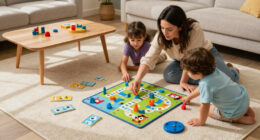

For families comparing the best active play systems for kids, the main choice is not simply which cube has the most games: it is whether you prefer a larger included library, a clear privacy control, or room to add titles later. I put the Owlzoom Motion Gaming Console first for its more than 20 included games and offline play without a subscription. The Nex Playground is my strongest pick for established four-player family sessions, while the Blackview PlayPop 8 Active Play System stands out for its camera cover and local motion processing.

Give the gift of listening to the whole family
- Choose a 1-, 3-, 6- or 12-month membership
- They pick the audiobooks they love
- Easy to send by email
The tradeoff is that most systems need an HDMI display and a power connection, and a longer-term game library may require an optional pass. The two PlayPop 8 listings share a name and core idea but have different package details: one calls out a remote and included power adapter, while the other specifies a physical camera cover and a separately required charger. I rank them by what each listing makes clearest, not by assuming the packages are interchangeable.
Complete the kit


Key Takeaways
- Owlzoom includes more than 20 games and works offline without an app, Wi-Fi setup, or subscription; its game roadmap has no stated timing.
- Nex Playground supports up to four players and includes five named games, with a separate Play Pass needed for the full catalog.
- The Blackview PlayPop 8 listing with the camera shutter adds a physical privacy control and includes an HDMI cable, remote, and 15W USB-C adapter.
- The other Blackview PlayPop 8 listing specifies a 12 MP, 176-degree camera and camera cover, but says a 15W-or-higher charger is needed separately.
- The PlayPop 8 Active Play System listing is compact and locally processes motion data, but it includes only five games and requires an optional subscription for the full library.
| Owlzoom Motion Gaming Console for Kids |  | Best for a subscription-free start | Included games: More than 20 | Age range: 3+ | Connection: HDMI | VIEW LATEST PRICE | See Our Full Breakdown |
| Nex Playground Active Play System for Kids and Families | 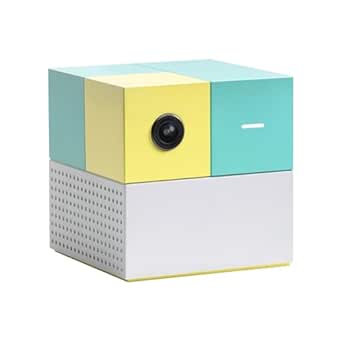 | Best overall for family multiplayer | Included games: 5: Fruit Ninja, Starri, Whac-a-Mole, Go Keeper, Party Fowl | Players: Up to 4 | Controls: Built-in motion-tracking camera; no controller required | VIEW LATEST PRICE | See Our Full Breakdown |
| Blackview PlayPop 8 Motion Gaming Console for Families |  | Best for privacy controls and bundled setup | Players: 1–4 | Included games: 5 preinstalled games | Motion tracking: 17-point body tracking | VIEW LATEST PRICE | See Our Full Breakdown |
| PlayPop 8 Active Play System for Kids and Families |  | Best compact option for a shared room | Included games: 5 | Players: 1–4 | Recommended age: 6 and up | VIEW LATEST PRICE | See Our Full Breakdown |
| Blackview PlayPop 8 Active Play System for Kids and Families |  | Best for detailed camera specs and a physical cover | Players: 2–4; availability varies by title | Included games: 5 | Listed game library: 36 games across six categories; optional paid GamePass | VIEW LATEST PRICE | See Our Full Breakdown |
| active play systems for kid | Included games | Players | Storage | Connection |
|---|---|---|---|---|
| Owlzoom Motion Gaming Console | More than 20 | — | — | HDMI |
| Nex Playground Active Play Sys | 5: Fruit Ninja, Starri, Whac-a-Mole, Go Keeper, Party Fowl | Up to 4 | 64 GB | HDMI |
| Blackview PlayPop 8 Motion Gam | 5 preinstalled games | 1–4 | 128 GB | HDMI |
| PlayPop 8 Active Play System f | 5 | 1–4 | 128 GB | — |
| Blackview PlayPop 8 Active Pla | 5 | 2–4; availability varies by title | 128 GB | — |
More Details on Our Top Picks
Owlzoom Motion Gaming Console for Kids
Owlzoom earns my top spot because it puts the clearest emphasis on a ready-to-play library: more than 20 included games, with offline play and no app, Wi-Fi setup, subscription, or handheld controller required. For a household that wants to connect a system to a TV and get children moving without first signing up for a service, that is a more direct proposition than the Nex Playground and both PlayPop 8 options, each of which lists five included games and a paid route to a broader library.
The motion controls are aimed at familiar active movements—jumping, reaching, stretching, and waving—and the package lists an HDMI cable and USB Type-C power cable. That reduces the number of setup pieces a buyer needs to source, though the system still depends on a TV and a power connection. The listing gives an age range of 3+, younger than the Nex Playground’s 5+ and the PlayPop 8 Active Play System’s 6+; families should still judge whether the game format and movement space suit their own child.
There is a meaningful limitation behind the generous included count. Additional games are described as forthcoming, but no release timing is specified. I would choose Owlzoom for the games already included, not on the assumption that new titles will arrive on a particular schedule. The listing also does not state multiplayer capacity, so I would not rank it ahead of Nex or the PlayPop models for a buyer whose main aim is a clearly specified four-player session.
Compared with the Nex Playground, Owlzoom offers a larger stated starter library and does not require a subscription for its included games, while Nex provides a named five-game lineup and explicitly supports up to four players. Compared with the shutter-equipped Blackview PlayPop 8, Owlzoom has the simpler subscription story, but it does not list a physical camera cover. It is my strongest fit for buyers who value immediate variety above detailed player-count and privacy specifications.
Pros:- More than 20 games are included.
- Works offline without an app, Wi-Fi setup, or subscription.
- Uses body movements for active play rather than a handheld controller.
- Includes an HDMI cable and USB Type-C power cable.
Cons:- Requires an HDMI-connected TV and a power source.
- Additional games are described as forthcoming, with no release timing specified.
- The supplied details do not state how many players can join at once.
Best for: Families who want a substantial built-in game selection and offline play without setting up an app, Wi-Fi, or subscription.
Not ideal for: Buyers who need a stated four-player limit, a physical camera shutter, or a clearly defined schedule for future game releases.
- Included games:More than 20
- Age range:3+
- Connection:HDMI
- Resolution:1080p
- Offline play:Yes
- Input:Motion sensor
- Included accessories:HDMI cable, camera body, USB Type-C power cable, manual, quick guide
- Warranty:One-year limited warranty
Our verdict“I recommend Owlzoom for families who want the broadest stated included library and subscription-free offline play, provided its unspecified multiplayer capacity is not a deciding factor.”
Nex Playground Active Play System for Kids and Families
Nex Playground is my leading choice when the main goal is an easy-to-understand family activity for several people. Its built-in wide-angle motion camera removes the need for handheld controllers, and the system explicitly supports up to four players. That documented group capacity gives it an advantage over Owlzoom, whose supplied details do not specify a player count, and makes Nex a more straightforward recommendation for siblings or family gatherings.
The five included titles are named—Fruit Ninja, Starri, Whac-a-Mole, Go Keeper, and Party Fowl—so buyers can see what is available before choosing. The tradeoff is that a separate Play Pass is required to reach the full catalog and monthly new games. Compared with Owlzoom’s more than 20 included games and no subscription requirement for offline play, Nex starts with a smaller list. Its case is strongest for households that value specified multiplayer support and a curated starter set, rather than maximum included variety.
Setup is simple in principle: connect the compact system to a TV or projector over HDMI and provide corded power. That keeps the device itself easy to move between rooms, but it is not a standalone play screen. A household without an accessible HDMI display should skip every system in this roundup, including Nex. The product is rated for ages 5 and up, a more limited stated age fit than Owlzoom’s 3+ listing.
Privacy is one of Nex’s clearer strengths: the listing says motion-tracking data is not stored or processed in the cloud and identifies kidSAFE+ COPPA certification. That is useful context for parents weighing a camera-based product. The Blackview PlayPop 8 listings go further in one specific way by listing a physical camera cover on one package, while Nex emphasizes cloud-data handling and family certification. I would pick Nex for its balance of group play, named starter games, and stated privacy information, while accepting that a broader catalog costs extra.
Pros:- Supports up to four players without handheld controllers.
- Includes five named games covering different kinds of active play.
- Compact device connects to a TV or projector over HDMI.
- States that motion data is not stored or processed in the cloud and lists kidSAFE+ COPPA certification.
Cons:- A separate Play Pass is required for the full game catalog and monthly new games.
- Requires an HDMI display and corded power.
- The stated recommended age is 5 years and up.
Best for: Families with children ages 5 and up who want a clearly specified four-player system, named starter games, and stated privacy practices.
Not ideal for: Buyers who want more than five games included without a pass, or who lack an HDMI-connected TV or projector.
- Included games:5: Fruit Ninja, Starri, Whac-a-Mole, Go Keeper, Party Fowl
- Players:Up to 4
- Controls:Built-in motion-tracking camera; no controller required
- Connection:HDMI
- Storage:64 GB
- Recommended age:5 years and up
- Power:Corded electric
- Privacy:Motion data not stored or processed in the cloud; kidSAFE+ COPPA certified
Our verdict“I’d choose Nex Playground for a family that values explicit four-player support and clear privacy information more than a large subscription-free starter library.”
Blackview PlayPop 8 Motion Gaming Console for Families
This Blackview PlayPop 8 listing stands apart by spelling out two practical details that are easy to overlook in camera-based play: a physical camera shutter and local motion processing. Parents can close the shutter when the system is not being used, rather than relying only on a software setting. The package also lists a remote, HDMI cable, and 15W USB-C power adapter, making it the most clearly bundled setup option in this group.
Its 17-point body tracking and support for one to four players put it in the same general family-multiplayer category as Nex Playground and the other PlayPop 8 listings. But the starter library is still five preinstalled games. Buyers looking for a bigger no-subscription selection should compare it with Owlzoom, which lists more than 20 built-in games and offline play without a subscription. Blackview instead makes more sense for households willing to consider GamePass if the included titles are not enough.
The compact cube adds 128 GB of storage, RGB lighting, and 4K video decoding, but those specifications do not change the main buying calculation: active play needs an HDMI-connected display, and extra game access is tied to GamePass. The remote may help with menus, though gameplay is described as motion-controlled. Its two-year warranty is a positive listing detail, but it does not remove the recurring-library tradeoff.
Compared with the Blackview PlayPop 8 Active Play System listing, this package specifies a remote and power adapter, while that other listing emphasizes a wide-angle camera, locally handled data, and an optional subscription. The separate Blackview listing with a 12 MP camera cover provides more camera specifications, but says a suitable charger is needed separately. I would select this version when the included accessories and shutter matter most, and verify the exact package before buying because the shared PlayPop 8 name does not make the listings interchangeable.
Pros:- Physical camera shutter offers a direct way to cover the camera.
- Lists local motion processing and support for up to four players.
- Includes an HDMI cable, remote, and 15W USB-C power adapter.
- Compact cube with 128 GB storage and a two-year warranty.
Cons:- Only five games are preinstalled; additional premium titles require GamePass.
- Requires a TV, monitor, or projector with HDMI.
- The listed video and lighting features add less to active play than the game library and camera controls.
Best for: Families who want a physical camera shutter, local processing, and an HDMI cable, remote, and power adapter listed in the package.
Not ideal for: Buyers who want a large included game library, subscription-free access to more titles, or a system that works without a TV or monitor.
- Players:1–4
- Included games:5 preinstalled games
- Motion tracking:17-point body tracking
- Storage:128 GB
- Connection:HDMI
- Included accessories:Remote, HDMI cable, 15W USB-C power adapter
- Privacy:Physical camera shutter; local motion processing
- Warranty:2 years
Our verdict“I recommend this PlayPop 8 package to privacy-conscious families who value a shutter and bundled setup accessories, with the understanding that more games require GamePass.”
PlayPop 8 Active Play System for Kids and Families
The PlayPop 8 Active Play System is a small cube built for moving between compatible displays: it connects by HDMI to a TV, projector, or monitor and uses a wide-angle camera for controller-free play. Its listed setup time of about one minute and sub-three-inch dimensions suit families who want an active-play system that can come out for a short session, then be put away. Compared with a conventional console setup, the compact form and no-controller format keep the equipment footprint modest.
It supports up to four players and is rated for ages 6 and up, so the intended use is a shared family activity rather than a single-child movement toy. Nex Playground offers a similar stated group limit and also names its five included games, while this PlayPop 8 listing gives no game names. Both systems require an optional purchase for a broader library; this model includes five games and describes its expanded library as subscription-based. Buyers should decide whether that route suits their household before treating the console as a long-term source of variety.
The privacy details are reassuring but specific: motion data is processed locally, with no cloud storage or uploads described. That is a meaningful distinction from products that leave processing details unstated, though it is not the same as the physical camera cover specified by another Blackview PlayPop 8 listing. If a visible mechanical camera block is a priority, choose the shutter-equipped package instead and confirm its accessories. This listing’s focus is compactness and local processing, not a documented shutter.
Its limits are practical. A display and corded power are required, and the included library is only five games. The camera tracking and 128 GB storage may sound substantial, but for active play the deciding question remains whether those included activities will keep the family engaged or whether the optional library will be needed. I place it below Nex because Nex identifies its starter games and adds stated family privacy certification; I place it above the other Blackview listing only for buyers drawn to its explicit age range, quick setup, and monitor compatibility.
Pros:- Supports up to four players with body-motion controls.
- Connects to TVs, projectors, and monitors over HDMI.
- Compact cube design and listed setup time of about one minute.
- Motion data is described as processed locally without cloud uploads.
Cons:- Includes only five games; access to the full library requires an optional subscription.
- Requires an HDMI display and corded power.
- The supplied details do not list a physical camera cover or name the included games.
Best for: Families who want a compact, quick-to-connect system for a TV, projector, or monitor and value local motion processing.
Not ideal for: Buyers who need a camera shutter, a large included game selection, or a system that does not depend on an external display.
- Included games:5
- Players:1–4
- Recommended age:6 and up
- Camera:Built-in wide-angle camera with AI motion tracking
- Connectivity:HDMI, USB 3.0, Type-C power
- Storage:128 GB
- Dimensions and weight:2.99 × 2.99 × 2.99 inches; 12.16 ounces
- Motion data:Processed locally; no cloud storage or uploads
Our verdict“I’d pick this PlayPop 8 for a compact shared-room system with local processing, but I would choose another option if game variety or a physical shutter matters more.”
Blackview PlayPop 8 Active Play System for Kids and Families
This Blackview PlayPop 8 version gives buyers the most detailed camera specification in the roundup: a 12 MP, 176-degree camera, 17-point AI body tracking, and a physical camera cover. It supports up to four players and processes camera and motion data on the device, so its appeal is a combination of group movement and stated privacy controls. Compared with the PlayPop 8 Active Play System from the other listing, this package explicitly mentions the camera cover and gives the field of view and resolution.
The catalog is described as 36 games across six categories, but only five are included; access to the full library requires a paid GamePass. That distinction matters more than the headline library size for a buyer deciding what is available immediately. Nex Playground also has five included games and a separate pass for the full catalog, while Owlzoom supplies more than 20 games without a subscription for offline play. This Blackview is therefore better for shoppers who value its camera details and expandable collection than for families who want the largest included selection.
Its 4K decoding, RGB lighting, built-in speaker, and 128 GB storage make the cube sound versatile, but this remains an HDMI-connected active-play device, not a display or independent game console. The listing supports connection to TVs, monitors, and projectors; it also says that a 15W-or-higher charger is required separately. That is a real setup difference from the other Blackview PlayPop 8 listing, which includes a 15W USB-C adapter. Check the package details rather than assuming that the shared name means the same accessories are in the box.
Game availability and player counts vary by title, so the overall four-player support should not be read as a promise that every game works with four people. I would place this option behind the shutter-equipped Blackview listing with bundled accessories for a buyer who wants a ready-to-connect package, and behind Owlzoom for subscription-free variety. Its strongest case is for a family that will use the optional catalog and values a physical camera cover alongside local processing.
Pros:- 12 MP, 176-degree camera with 17-point AI body tracking.
- Physical camera cover and on-device processing of camera and motion data.
- Supports up to four players and connects to TVs, monitors, or projectors.
- Describes a 36-game library across six categories, with optional GamePass access.
Cons:- Only five games are included; the full library requires paid GamePass.
- A 15W-or-higher charger is required separately.
- Player counts and game availability vary by title.
Best for: Families who want a physical camera cover, detailed wide-angle camera specifications, local processing, and the option to add a larger game library.
Not ideal for: Buyers who want a charger included, need certainty that every title supports four players, or prefer a large subscription-free starter library.
- Players:2–4; availability varies by title
- Included games:5
- Listed game library:36 games across six categories; optional paid GamePass
- Camera:12 MP, 176-degree wide-angle
- Motion tracking:17-point AI body tracking
- Connections:HDMI, USB Type-C
- Storage:128 GB
- Privacy and power:Physical camera cover; local processing; separate 15W-or-higher charger required
Our verdict“I recommend this Blackview version for camera privacy controls and a detailed motion-tracking setup, as long as the buyer accepts the separate charger and paid library expansion.”

How We Picked
I ranked these systems around the needs that make active play different from ordinary console gaming: how easily children can start moving, how much play is available without another purchase, how well a system fits a family or shared room, and what the listing tells buyers about setup and privacy. I gave added weight to included games and subscription requirements, because a controller-free system is less useful if the family cannot find enough included activities to keep using it.
I also compared each product’s player support, display connections, power and accessory details, and stated privacy features. A physical camera cover is a useful distinction from a general statement about local processing, while included cables and adapters can make a real difference on setup day. I did not treat similarly named PlayPop 8 listings as identical: their descriptions specify different accessories and charger requirements, so I retained those differences rather than combining them.
The ranking reflects the supplied product information, not hands-on testing. Where a listing leaves something open—such as future game availability, title-by-title player counts, or the exact extent of a game pass—I treat that as uncertainty rather than filling in missing details. All five options need a compatible HDMI display and power; the better fit depends on whether a buyer values a large included library, family multiplayer, privacy controls, or bundled setup accessories most.
Factors to Consider When Choosing Best Active Play Systems For Kids
I’d start by deciding how the family will actually use an active-play system: as a low-fuss source of movement games, a group activity for siblings and guests, or a camera-based console with a library that can grow. The feature lists overlap, but the products differ most in included content, privacy controls, and what comes in the box.
Compare the included games with the full library
Count only the games included at the start when comparing value in use. Owlzoom lists more than 20 included games and offline play without a subscription, making it the clearest choice for families who want variety without a pass. Nex and the PlayPop 8 systems list five included games; their broader catalogs require a separate Play Pass or GamePass. The Blackview listing that mentions 36 games describes the wider library, not 36 games included in the box. I would check the included-versus-optional distinction before focusing on a large library headline.
Also look for named titles and clear game details. Nex names its five starter games, while the PlayPop 8 listings do not name their included titles in the supplied information. Owlzoom gives a larger count but describes future additions without a release schedule. A specific count can help, but it cannot tell you whether the activities are right for a child; where game names are missing, expect less certainty about the exact play experience.
Choose for the group size you actually need
Nex and both PlayPop 8 descriptions explicitly support up to four players, making them easier to shortlist for siblings or family gatherings. The second Blackview listing says two to four players, while its description also notes that player counts vary by title. That qualification is useful: a system-wide maximum does not mean every game has the same multiplayer format. Owlzoom’s supplied details do not state a player limit, so I would ask the seller or check the current package information before choosing it for regular group play.
Think about the room as well as the number of players. Camera-based movement needs enough clear floor space for children to move safely without striking furniture or each other. The system connects to an external display, so the family needs a suitable viewing area and a screen that everyone can see. A four-player label does not make a small, crowded room comfortable for active movement.
Decide what camera privacy means for your household
These products use cameras or motion sensors to support controller-free play, so read the privacy details rather than treating all motion tracking as the same. Nex states that motion data is not stored or processed in the cloud and lists kidSAFE+ COPPA certification. The PlayPop 8 descriptions mention local processing; two Blackview listings also specify a physical shutter or camera cover. A cover gives a visible way to block the camera when play is over, while a local-processing statement describes how data is handled.
Owlzoom’s supplied information does not spell out a comparable cover or data-processing policy. That absence does not establish how the system handles data, but it means buyers who prioritize camera controls may prefer a product with explicit details. I would check current manufacturer information and the exact listing before purchase if camera privacy is a deciding factor.
Check the display, power, and package contents
All five systems depend on an HDMI display and a power connection, so they are not standalone toys. A TV, monitor, or projector with an available HDMI input is part of the setup. Owlzoom lists an HDMI cable and USB Type-C power cable; one Blackview PlayPop 8 package lists an HDMI cable, remote, and 15W adapter. The other Blackview version says a 15W-or-higher charger is required separately. Nex and the PlayPop 8 Active Play System also need a display and corded power.
Because the two Blackview packages have similar names but different accessory details, verify the exact ASIN and box contents. Do not assume that one listing’s included adapter, remote, or physical camera cover comes with the other. This is an easy way to avoid a setup surprise, especially if the system will be moved between rooms or taken to a gathering.
Match the stated age guidance and movement style
The listed age guidance varies: Owlzoom says 3+, Nex says 5 years and up, and the PlayPop 8 Active Play System says 6 and up. These are useful reference points, not a substitute for judging a child’s coordination, attention, and comfort with a motion-controlled game. If younger children will join older siblings, choose activities and room arrangements that suit the youngest participant rather than relying on the highest supported player count.
Active games can involve jumps, reaches, stretches, and waves, but each product’s specific movements depend on its titles. Leave space around the play area, keep the display and device stable, and supervise children as appropriate for their age. The system may be compact, but the players need room to move.
Treat secondary hardware specs as tie-breakers
Storage, video decoding, RGB lighting, and a built-in speaker may be useful, but they should not outrank the core questions: how many games are included, whether a pass is needed, how many players are supported, and what privacy controls are stated. The Blackview systems list 128 GB storage and 4K video decoding; Nex lists 64 GB. Those numbers do not by themselves tell a buyer how satisfying the active game selection will be.
I would use these specifications as tie-breakers after checking the game and setup fit. For instance, the shutter-equipped Blackview package may suit someone who values its accessory bundle, while the other Blackview version may suit someone who prioritizes a camera cover and is comfortable sourcing a charger. The right choice is the one whose documented tradeoffs match the household, not the one with the longest spec sheet.
Frequently Asked Questions
Do these active play systems need a TV?
Yes. All five listings describe an HDMI connection to a TV, monitor, or projector, and none is presented as a standalone screen. Check that the display has an available HDMI input and plan for a power connection as well. The PlayPop 8 Active Play System and Blackview version specifically mention compatibility with monitors or projectors; Nex describes connection to a TV or projector, while Owlzoom and the Blackview motion console list HDMI connection.
Which system includes the most games without a subscription?
Owlzoom lists more than 20 included games and says it works offline without an app, Wi-Fi setup, or subscription. Nex and the PlayPop 8 models each list five included games, with a separate pass or GamePass required for access to the full catalog. Blackview’s description of a 36-game library refers to the broader GamePass collection, not the included starter set.
Which options explicitly support up to four players?
Nex Playground, the Blackview PlayPop 8 Motion Gaming Console, and the PlayPop 8 Active Play System listing explicitly state support for up to four players. The second Blackview Active Play System listing gives a two-to-four-player range and notes that player counts vary by title. Owlzoom’s supplied information does not specify multiplayer capacity, so I would not assume a particular player limit without checking current product details.
Which systems list camera privacy features?
Nex states that motion-tracking data is not stored or processed in the cloud and lists kidSAFE+ COPPA certification. Both Blackview PlayPop 8 listings describe local processing; one specifies a physical camera shutter, and the other specifies a physical camera cover alongside a 12 MP, 176-degree camera. Owlzoom’s supplied details do not state an equivalent camera cover or data-processing policy.
Are the two Blackview PlayPop 8 listings the same package?
The supplied details do not support treating them as identical. The motion gaming console listing includes a remote, HDMI cable, and 15W USB-C power adapter, and mentions a physical shutter. The Active Play System listing gives a 12 MP, 176-degree camera and physical cover but says a 15W-or-higher charger is required separately. I would compare the exact listing and ASIN to confirm which accessories and privacy details apply.
Conclusion
For the largest stated included library and offline play without a subscription, I would choose Owlzoom, while accepting that its player capacity is not specified. For a family that wants named starter games, explicit four-player support, and stated cloud-data practices, I would pick Nex Playground and budget for a separate pass only if the broader catalog matters. Choose the Blackview PlayPop 8 Motion Gaming Console if a camera shutter and bundled remote, cable, and adapter are the priorities. The other Blackview PlayPop 8 Active Play System suits buyers who value detailed camera specifications and a physical cover, provided they are comfortable buying a charger and GamePass if needed. I’d reserve the PlayPop 8 Active Play System listing for households that want a compact, quick-to-connect setup with local processing. Whichever one fits, first confirm HDMI access, floor space, age suitability, and the exact included-game and accessory details.